
Kustomer AI Reviews: Getting the Full Picture
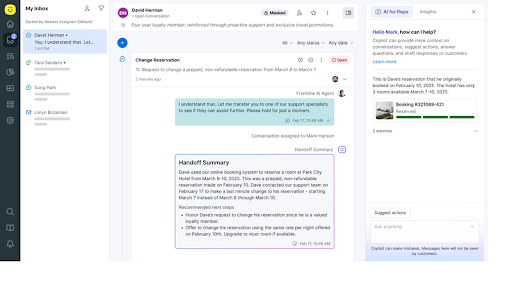
Do you want to cut support response times while giving agents a single view of every customer interaction? That is the main promise behind Kustomer AI. Instead of forcing teams to jump across tabs and piece together fragmented context, Kustomer centers support around a unified customer timeline.
Plenty of teams praise Kustomer for its workflow automation and omnichannel design, while others point to complexity, cost, and inconsistent AI performance. This review breaks down the product's main strengths, its recurring complaints, and the type of team it fits best.

Kustomer CRM's Key Features
Kustomer is designed as a modern CRM and service platform for customer support teams. Its core idea is simple: replace disconnected ticket views with a single timeline that brings together every customer interaction in one place.
Support teams can use Kustomer across:
- Chat
- SMS
- Social media DMs
- Voice interactions
Its AI layer adds automation and guidance on top of that foundation.
- Conversational AI can suggest replies and macros to human agents.
- Workflows can trigger actions such as routing by sentiment or tagging VIP customers.
- Reporting tools help teams spot patterns and performance shifts in real time.
- Integrations with systems like Shopify and Salesforce bring in order history, purchase data, and customer fields.
- Self-service portals and AI-powered knowledge search give customers faster access to answers.
For mid-sized teams that operate across several channels, Kustomer can serve as a useful source of truth. It tends to be most valuable when support operations are already dealing with omnichannel complexity.
Why Users Like Kustomer
The strongest positive theme in Kustomer reviews is context. Agents can see a customer's history, purchases, complaints, and prior support interactions in one place, which makes responses feel more informed and more personal.
Common advantages mentioned by users include:
- Unified customer view: Agents do not have to hunt through multiple systems to reconstruct the customer's history.
- Automation for repetitive work: AI can assist with tagging, routing, follow-ups, and next-step suggestions.
- Omnichannel inbox: Conversations from multiple channels land in one workflow instead of being split across separate tools.
- Reporting and insights: Teams can monitor resolution trends, CSAT, and issue spikes through dashboards and analytics.
- Onboarding support: Setup is not instant, but many teams value Kustomer's implementation help and guided configuration.
These strengths make Kustomer appealing for support organizations that need better visibility, stronger coordination, and less manual triage.
Where Kustomer Falls Short
The product also draws several recurring criticisms. Most of them come down to usability, pricing, and edge-case reliability.
Users most often mention:
- Steep learning curve: New users can find the interface dense and the automation setup harder than expected.
- Inconsistent AI on complex cases: The AI can struggle with nuanced, emotional, or multi-step conversations.
- Higher cost: Pricing can become difficult for smaller teams once AI features and extra channels are added.
- Implementation friction: Some teams report workflow glitches or mobile app issues during rollout.
- Limited niche flexibility: Out-of-the-box workflows fit retail and ecommerce better than highly specialized industries.
For teams with lean budgets or unusual support workflows, these issues can outweigh the benefits.

What Kustomer AI Reviews Tell Us
Overall, Kustomer is a solid option for support teams that want a unified omnichannel system with built-in automation. It is especially relevant for ecommerce-heavy organizations where customer history, routing logic, and channel consolidation matter a lot.
If your main concern is quick deployment into an existing support stack without replacing core systems, alternatives such as Aissist may be a better fit. Kustomer is strongest when a team is ready to adopt its platform model, not just add light automation.
| Pros | Cons |
|---|---|
| Unified timeline gives agents better context | Learning curve can be steep |
| Strong automation for repetitive workflows | AI can be inconsistent on complex cases |
| Omnichannel inbox simplifies operations | Pricing can be high for small teams |
| Shopify and CRM integrations add useful context | Rollout can involve workflow or app issues |
| Reporting helps teams spot trends early | Niche customization may require extra work |
FAQs
Is Kustomer AI a good fit for Shopify stores?
Yes. Kustomer's Shopify integration is one of its better-known strengths because it helps agents access order details, refunds, and purchase history without leaving the support workflow.
How reliable is Kustomer AI for harder customer issues?
It generally performs better on routine support tasks than on emotionally sensitive or highly nuanced issues. Many teams still rely on human handoff for those conversations.
Is Kustomer worth it for small support teams?
Usually only if the team has enough volume and complexity to justify the cost. Smaller teams may find the pricing and setup effort hard to justify.
How is Kustomer's onboarding experience?
Implementation support is often viewed positively, especially for teams that need help setting up workflows and integrations.
Which industries benefit most from Kustomer?
Kustomer is most often associated with ecommerce and retail support teams that need omnichannel visibility and strong customer-history context.