
How Can I Add AI to Zendesk? Your Go-To Guide for AI Integration
Is your support team facing endless ticket volumes? Do you want faster resolutions without expanding your team? You should add AI to Zendesk and automate routine tasks while also giving agents smarter tools to work with. Sounds pretty smart, right? You can do this easily by using certain built-in features, Marketplace apps, or even custom setups. Your support will go live in minutes based on your organizational needs.
Zendesk helps thousands of employees battling stress & anxiety by making their jobs easier. But entrepreneurs often ask, "How can I add AI to Zendesk?" This guide will pull real info from genuine user stories and proven workflows to share easy-to-follow steps. It doesn't matter if you can't code; this guide is the perfect fit for your needs.
How Does Zendesk's Native AI Get Activated?
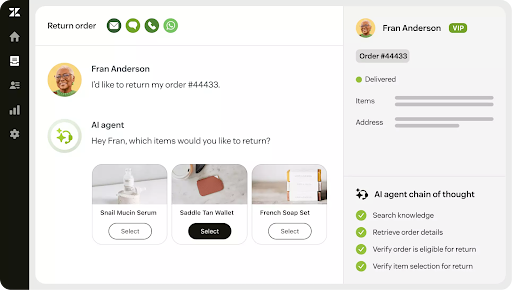
So, how can I add AI to Zendesk? Well, Zendesk has a built-in AI that turns on with little to no effort through Admin Center toggles. You'll get immediate ticket routing and agentic AI assistance from this AI.
You can set it up by:
- Going to AI & Automation in your Admin Center
- Navigating to AI Agents and enabling the "AI Agents" options there for customer-facing acquisitions
- Connecting your Help Center articles to the knowledge base
- Setting your brand voice, e.g., making your AI sound professional or talk to customers in a casual tone
- Defining escalation triggers like high-priority tags or sentiment scores
- Going to the People settings and toggling "Agent Copilot" for real-time reply suggestions and macro recommendations during ticket handling
This AI can take care of stuff like password resets or simple billing questions. Agents get summaries of long threads and predicted next actions, cutting response time by a margin. Also, it typically costs around $55 or more per agent per month for Suite Professional, which helps you unlock advanced generative features.
The cons:
- This built-in AI is limited to the data boundaries of Zendesk
- This AI struggles with external sources like Confluence docs or live CRM info
What Marketplace Apps Offer Plug-and-Play AI?
If you go to Zendesk Marketplace, you'll find over 100 AI apps. They install in less than half an hour via OAuth to enhance native features without the need to migrate.
- Search for "AI agents" in the Marketplace
- You'll see many popular choices like eesel, My AskAI, Ultimate, IrisAgent, Dust, BotDojo, Officely, etc.
- They connect instantly when you click install and authorize ticket read/write access
- Upload knowledge sources like Google Docs or past tickets
- Customize the AI persona by making it an empathetic tech support agent, and then activate the simulation mode to test this agent on historical data before going live
For instance, if you take the eesel AI workflow, you may:
- Link your Zendesk account and add scattered docs
- Set rules for auto-tagging and escalating matters to an actual agent
- Run simulations that test thousands of past tickets and show projected resolution rates (often 60% or higher)
The pros of this method are simple: you get rapid deployment with specialized controls like custom actions & multi-source learning. But you risk potential overlap with your native AI. Also, monthly fees can add to your Zendesk bills, piling up.
How Do Custom Integrations Build Advanced Workflows?
A third option is using Zendesk APIs or no-code tools like Zapier if tailored AI is your cup of tea. They can connect external models and go live in one or two days. We usually approach this method in two ways.
You should generate an API token in Admin Center > Apps & Integrations > Zendesk API. The Ticket API works well for automation triggers. If you want to embark on the no-code journey, Zapier will link "New Zendesk ticket" to OpenAI or Claude to give you content summaries & auto-responses. But if you have code-savvy teams, they may script Python webhooks for complex logic and pull live order data from Shopify.
The Dust.tt approach builds "Dust Apps" for your Help Center. You can connect data from Zendesk and define natural language procedures. Some examples here include "check refund eligibility." Don't forget to preview agent steps. You'll notice how this agentic AI serves well as a proactive Help Center AI by asking clarifying questions and adapting mid-conversation.
Practical rollout is possible when you test this method on 100 historical tickets via Postman. The strengths of this method are self-evident, i.e., you get exact-fit customization and handle unique data flows like real-time inventory. But this method demands testing discipline. Your custom code also needs constant maintenance for model upgrades.
What Steps Ensure Smooth Rollout?
Zendesk claims that AI agents can resolve up to 80% of your customer support issues. But you need to follow the right steps if you wish to know how can I add AI to Zendesk to get all these benefits.
Here's what you need to do:
- Inventory your knowledge first. Audit the Help Center and aim for covering 90% of your top ticket types.
- Pilot on a small scale and limit it to 10% of the total volume (go for Tier 1 tickets alone at this point).
- Customize by setting personas and thresholds, such as escalating a bit below 80% confidence. Add actions like auto-tagging here as well.
- Train AI agents in a 30-minute session that covers reviewing AI drafts and overriding AI prompts.
- Simulate extensively by using built-in modes on over 1,000 past tickets. Keep iterating until you hit 70%+ accuracy.
- Scale and optimize. Do a full rollout after seven days. Hold weekly reviews to cut costs by pruning low-ROI automations.
Ready to Add AI to Zendesk?
You can start in Admin Center today for instant gains and layer apps as complexity grows. Your team can scale to 80% automation by blending these methods smartly. For agentic options extending beyond Zendesk boundaries, there's a complementary path available. You can get it by booking a free Aissist.io demo today, and explore endless possibilities.
FAQs
1. How long until AI is live in my Zendesk?
Native can make your AI go live in 30 minutes. If you go for Apps, the wait period can be an hour or two (testing included).
2. Does AI need external data sources?
Native uses the Help Center. Apps connect Confluence/Docs to give richer responses.
3. What's a realistic automation rate?
You'll see 30% to 50% in the beginning. But once you optimize everything, you'll see an automation rate of 70%.