Compiled by Nadia Yun, Head of Marketing. All pricing, G2 and Capterra ratings, integration lists and developer documentation were read from primary sources between 15 and 21 September 2026. Disclosure: this guide is published by Aissist.io, which sells an agentic AI layer for customer service and sales. Aissist.io is not client onboarding software and is not ranked in this list — it appears only in one clearly marked section. No vendor reviewed this page before publication.
Every platform below will get a new customer from signed contract to go-live faster than a spreadsheet and a shared inbox. Where they diverge is what happens to the status afterwards — and five of the eight write it somewhere your CRM can read, while only three of those five also connect to a helpdesk.
TL;DR: Client onboarding software is bought on speed to go-live, but 56% of onboarding professionals told Rocketlane's 2022 survey that low progress visibility is their biggest cause of customer escalations — and only three of these eight platforms write status to a CRM and name a helpdesk integration.
Best for, at a glance
- Best for professional services teams that bill for implementation: Rocketlane
- Best for making implementation visible to the customer: GUIDEcx
- Best for onboarding status that reaches the helpdesk: OnRamp
- Best for HubSpot shops that want progress on the ticket record: Arrows
- Best for one workspace from deal room to go-live: Dock
- Best for Salesforce-native services delivery: Precursive
- Best for document-heavy onboarding in accounting and professional services: Content Snare
- Best for European SMB teams starting under €100 a month: Valuecase
The buying trap in this category is assuming that a tool which tracks onboarding will also tell anyone else about it. Five of these eight write status onto a CRM record, only three of those also name a helpdesk integration, and the capability is routinely sold one tier above the price you were quoted.
Methodology & sources
- Eight platforms assessed against six criteria; every price, rating and integration read off the vendor's own live pages and developer documentation during the week of 15–21 September 2026.
- Third-party ratings from G2 and Capterra product pages, read September 2026. Where a vendor's on-site rating claim disagreed with the live review platform, the review platform is quoted and the gap noted.
- Industry data from Rocketlane's State of Customer Onboarding 2022 (vendor survey, 100+ onboarding and implementation professionals), OnRamp's 2026 State of Onboarding (vendor survey, 161 leaders, fielded Q4 2025), Wyzowl's onboarding survey (vendor survey, 216 respondents, 2020), SPI Research's 19th Professional Services Maturity Benchmark (independent research, 509 organisations) and G2's own category definitions.
- Capability claims are stated as documentation, not as fact. Where a vendor does not publish something, this article says "not documented" rather than "does not exist" — absence of a public page is not absence of a capability.
- Disclosure: this is Aissist.io's blog, and Aissist.io sells AI customer service software. Aissist.io is not ranked in this list — it is not client onboarding software — and appears only in one clearly marked section about what happens to onboarding-driven tickets after go-live.
- One number we could not find: no published dataset measures first-90-day support ticket volume against steady state. We looked across Zendesk, Intercom, Gainsight, ChurnZero and Freshworks. Where this article discusses onboarding-driven ticket load, it uses named proxy evidence and says so.
How we compared these client onboarding platforms
We assessed eight platforms against six criteria, weighted in the order below, and ranked them on the balance of all six rather than on any single axis:
- Onboarding depth and the customer-facing experience. Does the customer get a real view of the plan, and what does it cost them to open it?
- Status visibility to the rest of the stack. Can a system outside the onboarding tool read where a customer is, without a human retyping it? This is the axis nobody else in this category assesses, and it is the one this article turns on.
- Helpdesk and CRM integration breadth, counted from named integrations with supporting documentation — not logos on a marketing page.
- Pricing transparency. A published number beats a good quote. "Quote only" is an honest answer; a blank page is not.
- Independent review standing, weighting review volume alongside score.
- Security and compliance documentation, assessed on what the vendor publicly documents rather than what it may hold.
What disqualified a tool. No longer trading independently — which removed Baton, acquired by ClientSuccess in June 2024 and now carrying a "joined forces with ClientSuccess" banner on its own homepage. No customer-facing view, which makes a tool internal project management rather than client onboarding software. And no third-party rating from any review platform, which leaves a buyer with nothing but the vendor's word.
Two rules we held ourselves to. Where a vendor's homepage and its own case study disagreed, we used the case study and said so. And where a vendor's marketing claim was contradicted by the review platform it cited, we quoted the review platform.
"Today, customers are updated on a minute-by-minute basis, even on the status of their pizza order, and there is no excuse for onboarding to be a black box." — Donna Weber, customer onboarding expert and author of Onboarding Matters, in conversation with Rocketlane
The 8 client onboarding software platforms at a glance
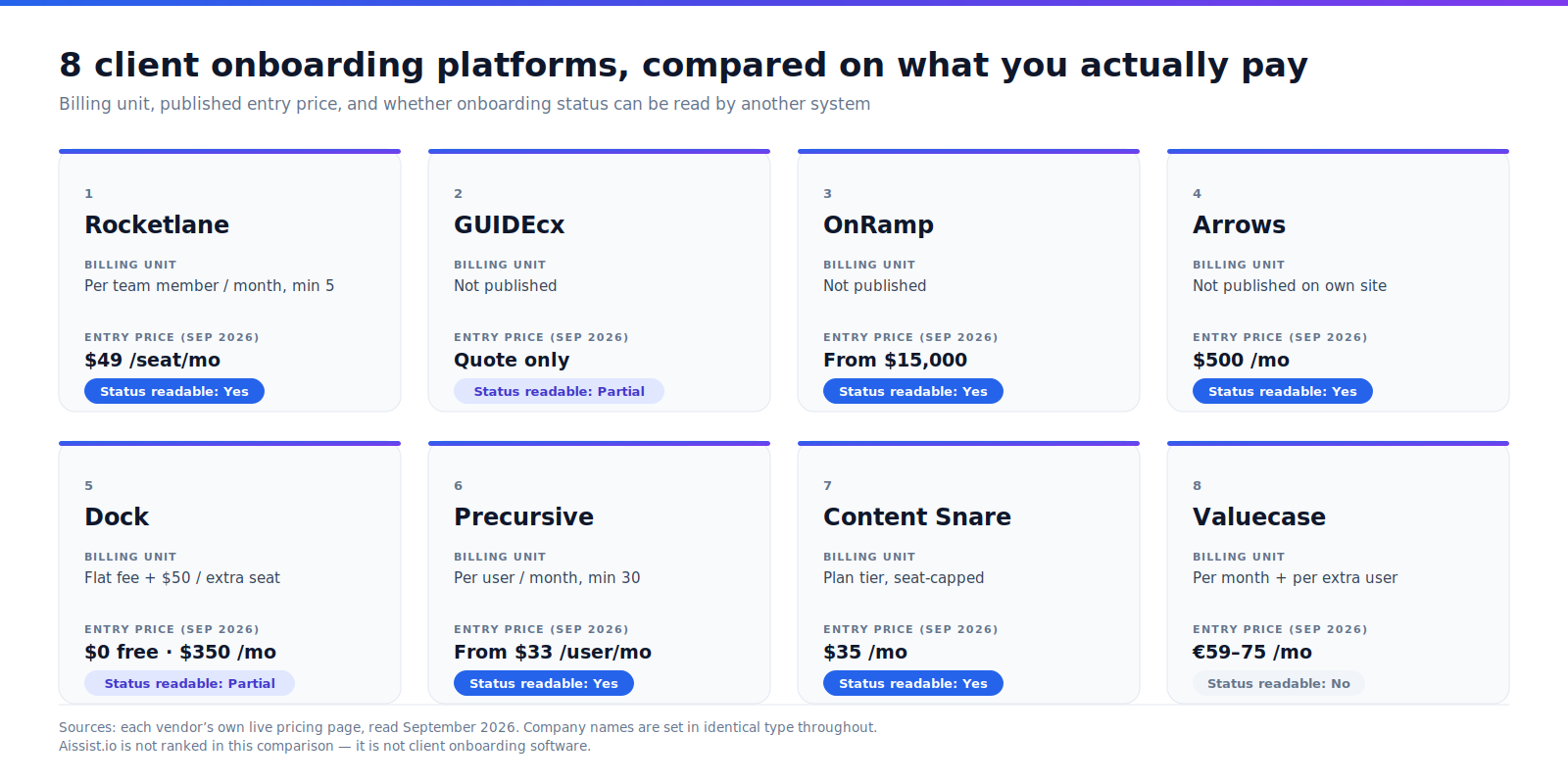
Published entry prices run from a free tier to $15,000, and only GUIDEcx publishes no price at any tier. Every figure below was read off the vendor's own live pages in September 2026.
| Platform | Best for | Billing unit | Entry price (Sep 2026) | Status readable by another system | G2 rating (n, Sep 2026) |
|---|---|---|---|---|---|
| 1. Rocketlane | Professional services teams that bill for implementation | Per team member/month, min 5 | $49 USD/team member/month, billed annually | Yes — REST API, named webhook events, Salesforce field write-back | 4.7 (871) |
| 2. GUIDEcx | Making implementation visible to the customer | Not published | Quote only | Partial — embeddable portal and Salesforce push-back; API reference not public | 4.6 (462) |
| 3. OnRamp | Onboarding status that reaches the helpdesk | Not published | From $15,000 (period not stated) | Yes — milestone sync to Salesforce/HubSpot; Zendesk and Intercom integrations | 4.4 (200) |
| 4. Arrows | HubSpot shops that want progress on the ticket record | Not published on own site | $500 USD/month (Growth, per HubSpot marketplace) | Yes — named HubSpot properties on Deal or Ticket objects | 4.8 (48) |
| 5. Dock | One workspace from deal room to go-live | Flat monthly fee + $50/extra seat | $0 free tier; $350 USD/month (Standard, 10 users) | Partial — webhooks on Premium, API Enterprise-only early access | 4.6 (481) |
| 6. Precursive | Salesforce-native services delivery | Per user/month, billed annually, min 30 users | From $33 USD/user/month (AppExchange listing) | Yes, architecturally — records live in your own Salesforce org | 4.2 (64) |
| 7. Content Snare | Document-heavy onboarding in accounting and professional services | Per plan tier, seat-capped | $35 USD/month, billed annually (2 users) | Yes — 30+ named webhook events, OAuth 2.0 API | 4.7 (54) |
| 8. Valuecase | European SMB teams starting under €100/month | Per month + per additional internal user | €59–75/month (1 internal user included) | No — API is inbound, reference is login-gated, no webhooks documented | 4.7 (74) |
Four of the eight publish no per-tier price on their own site: GUIDEcx, OnRamp, Arrows and Precursive. Two of those — Arrows and Precursive — are nevertheless priced in public, because a marketplace listing did what their own pricing page would not.
Who each client onboarding platform is built for
Rocketlane, OnRamp and Precursive sell to mid-market and enterprise teams; Arrows, Dock, Content Snare and Valuecase are built for SMB and lower mid-market; GUIDEcx spans both. Only three publish what customer-side access costs.
| Platform | Best-fit team | Customer portal access | Named helpdesk integrations | Time to first live onboarding | Publicly documented security |
|---|---|---|---|---|---|
| Rocketlane | Mid-market (80% of G2 reviewers) | Unlimited customer members, included | None documented; Zendesk appears as a logo only | No vendor claim | SOC 2, ISO 27001, ISO 42001, ISO 27701, GDPR, HIPAA, and four more |
| GUIDEcx | SMB to mid-market (26% SMB on G2) | "Unlimited projects, unlimited customers"; licensing treatment not published | Zendesk, Gainsight | "Most teams are fully live within 45 days or less" (vendor) | SOC 2 only |
| OnRamp | Mid-market to enterprise, US-centric | Branded portal in every plan; external-user terms not published | Zendesk, Intercom, Gainsight | "Within around 30 days of signing" (vendor) | SOC 2 Type 2, GDPR, HIPAA (the ISO 27001 cited is AWS's) |
| Arrows | SMB to mid-market, HubSpot-centric | Emailed invite; external-user terms not published | None documented; reaches support via HubSpot's Ticket object | "Days, not quarters" (vendor, for its sales product) | SOC 2 Type II, GDPR |
| Dock | SMB through enterprise | Free and unlimited; no login required | Intercom, as an embed | No vendor claim | SOC 2 Type II, GDPR |
| Precursive | Salesforce shops, mid-market to enterprise | Salesforce Experience Cloud portal with SSO; licensing not published | Zendesk, Gainsight | No vendor claim | "Aligned to" ISO 27001:2022 — not certified |
| Content Snare | Accounting, bookkeeping, agencies, professional services SMBs | Unlimited recipients, free; no login required | None documented; Zapier, Make, webhooks | No vendor claim; 14-day self-serve trial | ISO 27001 certified; AWS US-only hosting |
| Valuecase | European SMB and lower mid-market | Free, no account required | None documented | "Go live in days" (vendor) | ISO 27001:2022 certified; SOC 2 not listed |
1. Rocketlane — best for professional services teams that bill for implementation
Rocketlane is a professional services automation platform that runs customer onboarding, implementation and billable delivery projects in one system, deployed as a standalone SaaS tool alongside a company's existing CRM.
Technology: project and resource management with an agentic AI layer the vendor markets as "Nitro." Deploys onto: its own platform, syncing with Salesforce, HubSpot and Jira — it does not run inside your CRM. Channels: in-app portal, email notifications, Slack, Microsoft Teams. Actions it can take: creates projects from CRM records, assigns and reminds, tracks time and budget, writes progress fields back to Salesforce.
Status readable by another system: yes, and it is the best-documented programmatic access in this list. Rocketlane publishes a REST API with "Get project by Id" and "Get all projects" endpoints. It also publishes a named webhook event list — PROJECT_UPDATED, TASK_UPDATED and PHASE_UPDATED, with status transitions identified through a changeLog field — on its developer portal. And its Salesforce integration pushes Progress Percent, Blocked Tasks, Completed Milestones and the project URL onto the Salesforce record, per Rocketlane's integration guide.
Performance: GoCardless delivered 59% faster time-to-value and Gamify cut implementation from over 6 months to 30 days, both published as named case studies on Rocketlane's site. Rocketlane's homepage renders the Gamify result as an 86% reduction while the case study itself says 82%, so we quote the raw before-and-after instead.
G2: 4.7 (871 reviews), read September 2026 — G2's Rocketlane page, where 80% of reviewers are mid-market. Capterra shows 4.7 (127 reviews), read September 2026. Cost: Standard is $49 USD per team member/month billed annually with a five-member minimum; Premium is $69; the AI Fills add-on is $29/user/month; unlimited customer members are included on every paid plan, per Rocketlane's pricing page. A charge is triggered per internal seat, not per project, and only annual pricing is published.
Pros:
- Named webhook events and documented Salesforce write-back fields, so onboarding status can reach another system without a human retyping it
- Ten publicly documented certifications including ISO 27001 and ISO 42001 for AI management — the deepest compliance page in this comparison
- Published per-seat price with unlimited free customer-side members
Cons:
- No documented native helpdesk integration. Zendesk appears as a logo on the integrations page with no supporting documentation; Intercom and Freshdesk are not listed
- Five-seat minimum at $49 puts the annual floor near $2,940 before the AI add-on, which rules out very small teams
- Its own homepage overstates its Gamify case study — 86% against the study's 82% — and no embeddable portal is documented, so the customer view lives on Rocketlane's domain
Our take: Rocketlane is the strongest choice when implementation is a service you sell and staff, because it treats utilisation and margin as first-class alongside the project plan. Skip it if your onboarding team is three people, or if the thing you actually need is a Zendesk integration.
"Rocketlane just works out of the box and gives me the insights I need. The hard part is figuring out the strategy." — Costa Xynos, Professional Services Lead, GoCardless
2. GUIDEcx — best for making implementation visible to the customer
GUIDEcx is client onboarding software that runs implementation projects through a shared customer-facing portal, deployed as a standalone platform that syncs two-way with Salesforce and HubSpot.
Technology: project management with a retrieval-based AI coach on the Premium tier and a built-in Workato iPaaS. Deploys onto: its own platform; uniquely in this list, the customer portal can be embedded inside your product. Channels: customer portal, email, SMS notifications, Slack, Microsoft Teams. Actions it can take: launches projects on Closed Won, assigns tasks to customer-side owners, runs CSAT surveys, pushes project data into Salesforce.
Status readable by another system: partially, and the most useful part costs extra. GUIDEcx is the only platform here that can embed its customer portal in your own application. Its help documentation is explicit: "Embed the customer onboarding portal (Compass) into your own website or application." The catch is commercial — the same page states the embed "is included in the advanced tier but can be activated for any tier for an extra fee," per GUIDEcx's help centre. Its Salesforce integration separately states that "as the project progresses, GUIDEcx data is automatically fed into Salesforce." An Open API v2 exists but its reference is not publicly readable, and we found no documentation for native outbound webhooks.
Performance: Kount cut onboarding time by 43% from a 90–120 day baseline and raised capacity per manager from 10–12 integrations to 17–20, per GUIDEcx's Kount case study. GUIDEcx also claims "most teams are fully live within 45 days or less" — a vendor claim about its own implementation, unattributed to any customer. Its homepage carries four further percentages with no named source or methodology, which we have left out.
G2: 4.6 (462 reviews), read September 2026 — G2's GUIDEcx page, 26% small business. Capterra shows 4.7 (64 reviews), read September 2026, with a standout 4.9 for customer service. Cost: quote only. All three tiers read "Speak to Sales for pricing" on GUIDEcx's pricing page, which also states plainly: "We don't currently offer a free trial." No billing unit, seat minimum or entry number is published, so the cost of the tier carrying the AI features cannot be established from public sources.
Pros:
- The only platform here whose customer portal can be embedded inside your own product, which puts onboarding status where the customer already is
- Names Zendesk and Gainsight as documented integrations — rarer in this category than it should be
- "Unlimited projects, unlimited customers" on every tier, and a 4.9 Capterra score for customer service that its own case studies corroborate
Cons:
- No published price at any tier and no free trial, so evaluation starts with a sales call
- Native webhooks are not documented and the API reference is not publicly readable, which makes programmatic integration hard to scope before you buy
- Documents SOC 2 only; ISO 27001, HIPAA and data residency are not stated on any page we could reach
Our take: GUIDEcx is the pick when the customer's experience of onboarding is the product, and the embeddable portal is a genuine differentiator worth paying the extra fee for. Skip it if you need to scope an API integration before signing, or if a published price is a procurement requirement.
"A lot of tools have internal-facing project management for onboarding, but it's not a customer partnership. It's different with GUIDEcx." — Brooke Cantwell, Customer Experience Manager, Kount
3. OnRamp — best for onboarding status that reaches the helpdesk
OnRamp is a customer onboarding and engagement platform for B2B teams that runs playbook-driven implementation projects through a branded customer portal, deployed as a standalone platform with two-way Salesforce and HubSpot sync.
Technology: playbook automation with an agentic AI layer the vendor calls Aero, included in all plans rather than sold as an add-on. Deploys onto: its own platform, with the deepest named helpdesk integration list here. Channels: customer portal, email, Slack, Microsoft Teams, Zoom. Actions it can take: launches projects from the CRM, assigns and reminds automatically, collects e-signatures, writes onboarding milestones back to the CRM record.
Status readable by another system: yes, and it is the only platform here naming both Zendesk and Intercom. OnRamp's process automation page states: "Sync OnRamp's onboarding milestones directly with your Salesforce or HubSpot account to get a complete view of each customer in your CRM. With real-time updates and automated record-keeping, OnRamp eliminates manual data entry and system-switching," per OnRamp's own documentation. Both Zendesk and Intercom appear as named integrations on its integrations page. The limit is developer-grade access: the page references "OnRamp's open API" but no public API reference is available, and webhooks are not mentioned.
Performance: Qualia cut go-live time by 53%, scaled onboarding capacity 3x in under a year and raised its onboarding graduation rate from 92% to 99%, per OnRamp's Qualia case study. OnRamp also claims "most teams are running their first live onboarding within around 30 days of signing" — vendor-claimed and hedged. Its own 2026 survey of 161 leaders found 62% of CS leaders lack real-time visibility into customer progress during onboarding, an unusually candid statistic for a vendor to publish about its own category.
G2: 4.4 (200 reviews), read September 2026 — G2's OnRamp page. Note the slug is onramp-technology; g2.com/products/onramp returns an unrelated hosting category, which is how comparison articles end up citing the wrong page. Cost: "OnRamp pricing starts at $15,000 and scales based on your onboarding volume, team size, number of playbooks, and integration requirements," per OnRamp's pricing page, which does not state whether that figure is annual. Tiers run Basic to Premier. There is no self-serve free trial, only a sandbox during evaluation.
Pros:
- The only platform in this comparison naming both Zendesk and Intercom, alongside real-time milestone sync to Salesforce and HubSpot
- Publishes a starting price despite gating its tiers — unusual and useful at the enterprise end of this category
- SOC 2 Type 2, GDPR and HIPAA documented by OnRamp itself, with named enterprise customers including CVS Health and Betterment
Cons:
- No public API reference and no documented webhooks, so integration beyond Salesforce, HubSpot and Zapier has to be scoped with the vendor
- A $15,000 floor with no self-serve trial makes this the highest dollar entry point here, and the pricing page does not say whether that figure is annual
- The ISO 27001 cited on its security page is AWS's certification as the host; we found no OnRamp-held ISO 27001, and no data-residency options are stated
Our take: OnRamp is the clearest answer in this list to "can my support team see that this customer is mid-migration," because the CRM sync and the helpdesk integrations are both named and documented. Skip it if you are under $15,000 of annual budget, or if you need developer-grade webhooks rather than CRM field sync.
"OnRamp's overall strength is project planning functionality – having that functionality extremely robust and suited for our needs was the biggest differentiator for our team." — Colleen Grande, Senior CS Operations Analyst, Qualia
4. Arrows — best for HubSpot shops that want progress on the ticket record
Arrows is a HubSpot-native onboarding and sales-execution platform whose onboarding plans write progress into custom HubSpot properties on Deal or Ticket records, deployed as a HubSpot marketplace app rather than a standalone system.
Technology: plan templates plus an AI agent layer; as of September 2026 the marketing site leads with sales execution rather than onboarding. Deploys onto: HubSpot, deeply — this is the only platform here whose primary architecture is a CRM app. Channels: emailed plan invites, customer portal, Slack channel and DM notifications. Actions it can take: creates and updates HubSpot properties, triggers HubSpot workflows and pipeline stage changes, creates HubSpot tasks, syncs form responses and file uploads onto the connected record.
Status readable by another system: yes, and for support teams it is the most direct answer here. Arrows creates named HubSpot custom properties — "Plan status," "Task completion percentage," "Overdue tasks," "Current task name," "Current phase name" and "Participant progress blocked" among roughly sixty, available on Growth, Business and Enterprise plans, per Arrows' sync documentation. Critically, a plan can be attached to HubSpot's Ticket object, which puts onboarding progress on the record a support agent already has open. Four limits are worth knowing: one object type per plan template; HubSpot custom objects require Enterprise on both sides; the Salesforce integration names no equivalent fields; and no public REST API or webhooks are documented.
Performance: HubSpot itself is the published case study, reporting 15 hours per week saved per onboarding specialist. On the headline figure, Arrows' page and its customer's quote disagree — the page says onboarding was accelerated by 30%, while Jon Dick's quote describes "a 30% increase in the time to value," which reads the opposite way. We quote him verbatim below and leave the arithmetic to the reader.
G2: 4.8 (48 reviews), read September 2026 — G2's Arrows page. The HubSpot App Marketplace shows 4.9 from 53 reviews with 2,000 installs and describes Arrows as "the only HubSpot Certified customer onboarding app." Its Capterra listing has zero reviews and should not be cited. Cost: Arrows' own pricing page is quote only — "The price depends on the work, deal coverage, and context involved" — but the HubSpot marketplace publishes "Onboarding Plans - Growth Tier" at $500/month. Business and Enterprise prices are not published.
Pros:
- Named, readable HubSpot properties on Deal or Ticket objects — the shortest path in this comparison from onboarding plan to something a support agent sees
- HubSpot Certified, 2,000 installs and a 4.9 marketplace rating, so the integration is battle-tested rather than a checkbox
- Onboarding progress can trigger HubSpot workflows, pipeline stage changes and segments, which turns status into automation rather than a dashboard
Cons:
- No public REST API and no documented webhooks. Outside HubSpot, there is no documented way to read plan status
- During 2026 the marketing site repositioned around AI sales execution and pricing moved from published tiers to quote-only, so the onboarding product's roadmap is worth confirming directly
- Only 48 G2 reviews, a fraction of Dock's 481 or Rocketlane's 871, and external-user licensing terms are not published
Our take: If you run HubSpot and want your service team to see onboarding progress without opening another tab, Arrows is the most direct route available and nothing else here matches it. Skip it if you are on Salesforce, or if you need an API that is not HubSpot's.
"Think about Arrows as a wonderful map where both the client and your Onboarding team can see where we are at any time. 'YOU ARE HERE' kind of red dot on a map." — Jon G., Head of Customer Success, mid-market reviewer, G2
5. Dock — best for one workspace from deal room to go-live
Dock is a revenue enablement platform providing shared client-facing workspaces that span digital sales rooms, client portals and onboarding plans, deployed as a standalone platform integrated with Salesforce and HubSpot.
Technology: shared workspaces with templating, content management and engagement tracking. Deploys onto: its own platform; workspaces can be created automatically from CRM deal stages. Channels: browser-based workspace with no login, email, Slack, Microsoft Teams. Actions it can take: creates workspaces from templates, completes tasks, syncs order-form line items and attaches completed PDFs to the CRM record, pushes engagement activity to the CRM timeline.
Status readable by another system: partially, and the useful parts are gated. Dock has real webhooks that "allow you to push all the workspace activity data out of Dock for use in other applications," plus an API. But Dock's own announcement states both are "available now to Enterprise customers through our early-access program," and its pricing page confirms webhooks start at Premium while API access is Enterprise-only. On the CRM side, Dock pushes activity and attachments to the record timeline. We found no documented CRM field carrying onboarding progress — which is the difference between an agent seeing a percentage and an agent scrolling a timeline.
Performance: BrightHire reported a 25% faster time-to-value for SMB onboardings and a 50% reduction in SMB onboarding effort, per Dock's BrightHire case study; Loom reported 2 hours saved per customer and 20% higher seat allocation among customers who engage with Dock during onboarding. One caution for anyone else fact-checking this category: the "11% conversion rate" figure that circulates about Dock is dummy text inside a mock screenshot on its homepage, not a claim Dock makes.
G2: 4.6 (481 reviews), read September 2026 — G2's Dock page, the second-largest review base in this comparison. Cost: published in full on Dock's pricing page: Free at "$0 forever" for 5 users, Standard at $350 USD/month for 10, Premium at $1,000 USD/month billed annually for 25+, Enterprise custom, with additional seats at $50/month. The billing unit is a flat platform fee with a bundled seat allowance, and external collaborators are explicitly free: "Dock only charges for internal team members."
Pros:
- Genuinely free tier and fully published pricing at every paid step — the most transparent pricing page in this comparison
- Customers open a workspace without creating a login, with five documented access-control modes from open link to passcode
- One system covers the deal room and the onboarding plan, so the pre-sale context does not get retyped after Closed Won
Cons:
- API access is Enterprise-only and described as early access, and webhooks require Premium at $1,000/month — the integration surface sits well above the entry price
- CRM write-back is activity and attachments rather than a documented status field, so a support agent gets a timeline rather than a progress percentage
- Intercom appears only as an embed, no Zendesk integration is listed, and ISO 27001, HIPAA and data residency are not documented
Our take: Dock is the best-value entry point here and the right answer when the same workspace should carry a customer from first pitch to go-live. Skip it if you need programmatic status access without an enterprise contract.
"Dock has reduced our time to value for SMB onboardings by about 25%." — Porter Williams, VP of Customer Success, BrightHire
6. Precursive — best for Salesforce-native services delivery
Precursive is a professional services automation platform built 100% natively on Salesforce that runs customer onboarding, implementation and resource management inside the customer's own Salesforce org.
Technology: PSA with AI features, running as a managed Salesforce application rather than a separate SaaS product. Deploys onto: Salesforce, entirely — this is the only platform here with no database of its own. Channels: Salesforce Experience Cloud portal with SSO, Slack project channels, email. Actions it can take: converts sold services into delivery plans from Sales Cloud and CPQ, runs managed services from Service Cloud Cases, allocates resources, tracks time and revenue.
Status readable by another system: yes, architecturally — and the claim deserves a precise statement rather than a generous one. Because Precursive is native to Salesforce, onboarding records are Salesforce records in your own org. They are queryable by Salesforce's own REST, SOAP and Bulk APIs, by Flows and reports, and by the Power BI, Tableau, Snowflake and Redshift connectors Precursive names on its integrations page. That page states services execution "lives in the same system where revenue is sold." What it does not provide is a Precursive-specific API reference, a published webhook event list, or a named status field — so the readability is a property of the architecture, not of a documented sync.
Performance: Dealertrack reported $1M per year saved on travel costs alone through increased visibility and Relias reported $100k+ in time and labour cost savings, both published as named case studies on Precursive's customers page. Named logos include Visa, PagerDuty, Veeam and Greenhouse. Precursive's homepage claims "5-star user ratings on G2 and AppExchange"; G2 shows 4.2, so we use G2's number.
G2: 4.2 (64 reviews), read September 2026 — G2's Precursive page, the lowest score in this comparison. The Salesforce AppExchange listing shows 4.99 from 72 reviews; we weight G2's larger sample more heavily. Cost: Precursive's own pricing page is quote only but states the mechanics precisely — "Our subscription based plan is billed annually, charged per user per month" and "Our minimum is 30 users." The AppExchange listing shows "Starting at $33" per User/Month. Salesforce licences are a prerequisite cost on top, since the product runs in your org.
Pros:
- Onboarding data lives in your own Salesforce org, so every reporting, BI and warehouse tool you already point at Salesforce can read it with no new integration
- The longest named integration list here, including Zendesk, Gainsight, Slack, Jira, Workato, MuleSoft, Power BI, Tableau and Snowflake
- Best-attributed outcome numbers in this comparison — real dollar figures tied to named enterprise customers
Cons:
- A 30-user minimum plus Salesforce licences makes this the highest seat floor in the list, and it excludes SMBs entirely
- The thinnest security documentation here: "aligned to ISO/IEC 27001:2022" rather than certified, and we found no SOC 2 claim, GDPR statement or security page on the marketing site
- Lowest G2 score of the eight at 4.2, and Experience Cloud licensing cost for the customer portal is not disclosed
Our take: For a Salesforce-standardised services organisation, Precursive removes the sync problem by removing the second database, which is a structurally better answer than any integration. Skip it if you are not on Salesforce, if you have fewer than 30 users, or if procurement needs a SOC 2 report.
"Precursive is fully native to Salesforce, so everything lives in one place with no need to duplicate data or switch tools." — Ryan F., Vice President of Customer Delivery, mid-market reviewer, G2
7. Content Snare — best for document-heavy onboarding in accounting and professional services
Content Snare is client onboarding software for collecting documents and information from clients, running structured request workflows with automatic follow-up, deployed as a standalone platform with a no-login client portal.
Technology: request and form workflows with automated chasing; not a project-management tool. Deploys onto: its own platform, integrating with document stores and practice-management software rather than CRMs. Channels: client portal by secure link, email, SMS reminders. Actions it can take: requests and validates documents and fields, approves or rejects submissions, chases automatically, files completed documents to Google Drive, Dropbox, OneDrive or SharePoint.
Status readable by another system: yes, and it is the most precisely documented in this comparison. Content Snare publishes a full webhook event list including request_created, request_published, request_completed, all_fields_completed, field_completed, field_approved, field_rejected and request_board_column_changed, with a status field in the payload, per its webhook documentation. It also publishes an OAuth 2.0 REST API and nine named Zapier triggers. You can know exactly which event fires when before you buy — which none of the quote-only platforms here allow.
Performance: Content Snare's own customer survey reports 71% less time gathering information, with respondents moving from 25 hours a month to 5.1 hours, and a median 77% reduction in costs, per its published results survey. Treat these as a vendor survey: the methodology says only that "1 in 10 replied," and the respondent count and field dates are not disclosed.
G2: 4.7 (54 reviews) on G2 and 4.9 (101 reviews) on Capterra, both read September 2026. Cost: fully published on Content Snare's pricing page: Basic at $35 USD/month billed annually ($42 monthly) for 2 users and 20 active requests, Plus at $71 ($85) for 5 users, Pro at $119 ($143) for 10 users, Custom at $215+ ($258+) for 20+. A charge is triggered by the plan tier and its seat and active-request caps, not per client — clients and recipients are unlimited on every plan. Free 14-day trial, no credit card, no contract.
Pros:
- Cheapest paid entry point here at $35/month, with unlimited free clients and no login, no password, no app to install for the client
- The only vendor in this comparison publishing a complete webhook event list and payload schema, so integration is scopeable before purchase
- ISO 27001 certified — an actual certification, where Precursive claims only alignment and four others document neither
Cons:
- No native Zendesk, Intercom, Freshdesk, Salesforce or HubSpot integration is documented. Everything goes through Zapier, Make or your own webhook consumer
- It collects information; it does not manage a project plan, allocate resources or track a go-live date, so it is a component rather than a platform
- Hosted on AWS in the United States only, with no SOC 2 or HIPAA claim — a constraint for EU and healthcare buyers
Our take: For an accounting firm, bookkeeper or agency whose onboarding bottleneck is genuinely "the client hasn't sent the documents," Content Snare solves that better and cheaper than any project tool here. Skip it if you need Gantt charts, resource management or a native CRM connector.
"Content Snare has helped save time and reduce back and forth followup with clients by having the client go through a digital checklist, upload their documents, and answer questions prior to our discussion of their tax return." — Teresa T., Director and Tax Agent, accounting firm of 2–10 employees, Capterra
8. Valuecase — best for European SMB teams starting under €100 a month
Valuecase is a shared-workspace platform spanning B2B sales and customer onboarding, giving each customer a link-shared "Space" carrying the plan, intake forms, training content and chat, deployed as a standalone platform from a German vendor.
Technology: shared spaces with engagement tracking and templating. Deploys onto: its own platform, syncing with Salesforce and HubSpot. Channels: browser-based Space by shared link, email, Slack, Microsoft Teams. Actions it can take: creates and personalises spaces from CRM data, collects form responses, tracks per-stakeholder engagement, schedules through Calendly.
Status readable by another system: not on the evidence published. Valuecase's API page describes the API as inbound — it "enables you to put space creation and personalisation on auto pilot" by passing data into Valuecase — and the reference itself sits behind the product login. No webhooks are documented, no CRM status write-back is claimed, and no helpdesk appears in its published integration list. The customer-facing Space is a genuine external status surface for the customer; it is not one your support tooling can read.
Performance: Welcome to the Jungle cut onboarding time by 30–40% and reported a 40% reduction in time to value, per Valuecase's WTTJ case study. Two figures we could not reconcile: Valuecase's homepage headline claims 50% faster, which is more than its own detailed case study supports, and its site claims 4.9/5.0 on G2 while G2 currently shows 4.7.
G2: 4.7 (74 reviews), read September 2026 — G2's Valuecase page. Cost: published on Valuecase's pricing page: Starter at €59–75/month, Growth at €119–159, Scale at €299, each including one internal user, with additional internal users at €75–90/month. The page carries an annual-discount toggle whose state we could not confirm, so we quote the range rather than pick a number. A charge is triggered per internal seat above the first; customers cost nothing — "you don't need to pay for your prospects / customers - they don't even need an account." Free 14-day trial.
Pros:
- Lowest published entry price among the European options, with a self-serve 14-day trial and no sales call required
- ISO 27001:2022 certified with a German legal entity and detailed GDPR documentation naming every subprocessor — the strongest privacy paper trail here for an EU buyer
- Customers open a Space with no account and no IT ticket, which removes the most common reason a customer never logs in
Cons:
- No helpdesk integration, no documented webhooks, and an API reference you cannot read until you are a customer — the least publicly documented integration surface of the eight
- Per-seat economics invert at scale: one internal user on Growth is €119/month, while twelve is roughly €944, so a tool that wins your trial on price can lose badly at rollout
- SOC 2 is not listed on its trust centre, which is a gap for US enterprise procurement even where ISO 27001 covers the EU requirement
Our take: For a European SMB running sales and onboarding out of the same workspace, Valuecase is the cheapest credible start and the ISO 27001 certification is real. Skip it if more than three or four people need seats, or if onboarding status has to reach any other system.
"Valuecase has revolutionized our onboarding process. We've cut onboarding time by 30-40% and saved hours per manager each month. This efficiency allows us to focus on strategic growth and strengthening our customer relationships." — Anne-Claire Soulé, Head of Onboarding & Production, Welcome to the Jungle
What client onboarding software actually costs
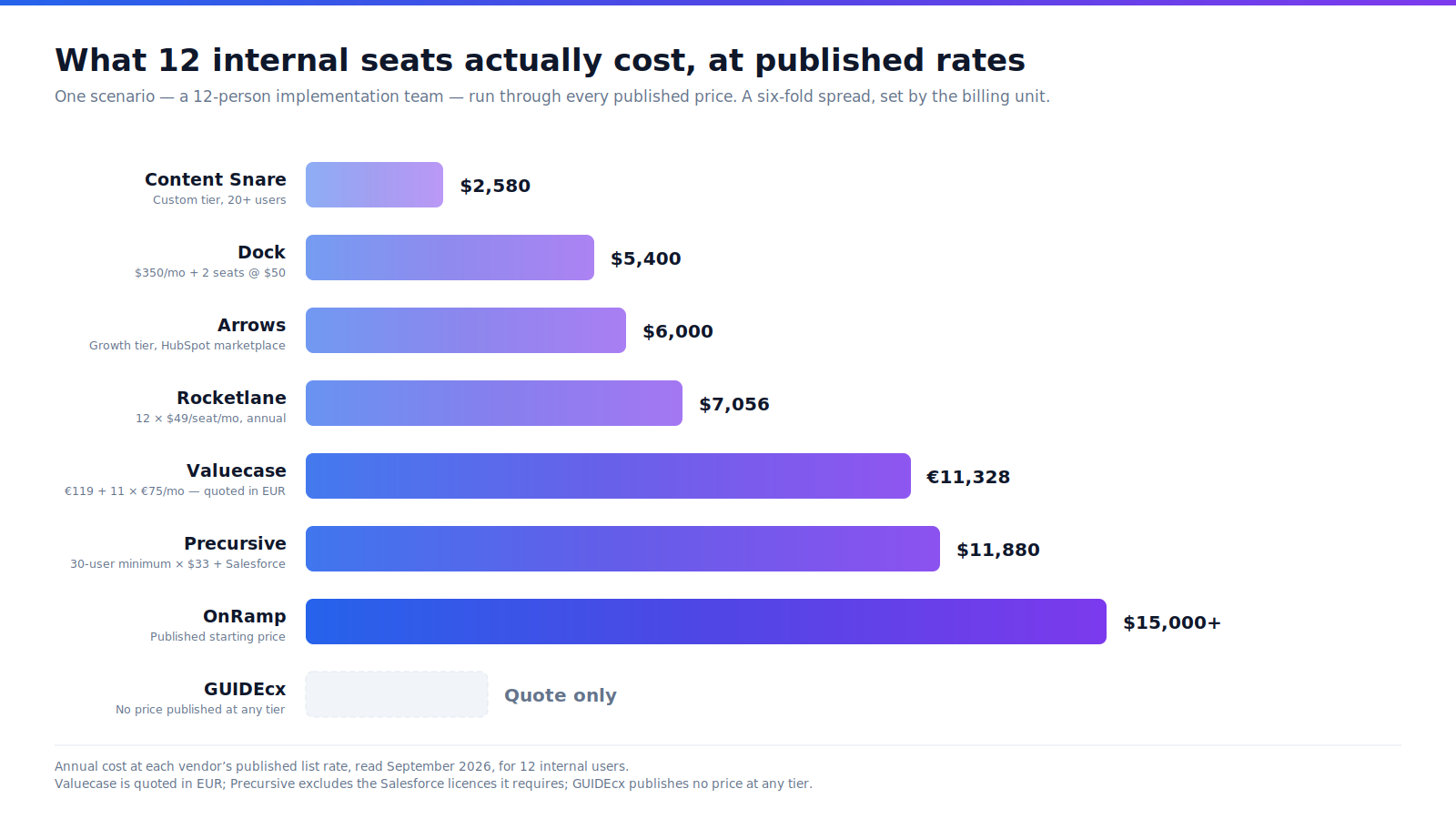
A twelve-person implementation team pays between $2,580 and $15,000+ a year at published rates — a six-fold spread that has almost nothing to do with features and almost everything to do with the billing unit.
Run that one scenario through every published price:
| Platform | Billing unit | Cost for 12 internal users (Sep 2026) | At published rates |
|---|---|---|---|
| Content Snare | Plan tier, seat-capped (Custom, 20+ users) | $215+/month, billed annually | $2,580+ /year |
| Dock | Flat $350/month for 10, +$50/seat | $450/month | $5,400 /year |
| Arrows | Not published; marketplace Growth tier | $500/month | $6,000 /year |
| Rocketlane | Per team member/month, billed annually | 12 × $49 = $588/month | $7,056 /year (+$4,176 with AI Fills) |
| Valuecase | Growth: €119 for 1 user, +€75 per extra | €119 + 11 × €75 = €944/month | €11,328 /year |
| Precursive | Per user/month, 30-user minimum | 30 × $33 = $990/month | $11,880 /year + Salesforce licences |
| OnRamp | Not published | From $15,000 | $15,000+, period not stated |
| GUIDEcx | Not published | Quote only | Quote only |
Valuecase's Starter tier cannot carry this scenario — it includes one internal user, as every tier does — so the model uses Growth and the low end of both published ranges. Four traps hide in that table.
The seat-minimum trap. Precursive's $33 is the cheapest per-user number in the list and one of the two highest totals, because you cannot buy fewer than thirty users. Rocketlane's five-member minimum does the same thing at a smaller scale.
The inversion trap. Valuecase is among the cheapest options here at one seat and among the dearest at twelve, because its plan price buys a single internal user.
The integration-tier trap. This is the expensive one. Dock's cheapest paid tier is $350 a month, but webhooks start at Premium — $1,000 a month — and API access requires an Enterprise contract. GUIDEcx's embeddable portal is "included in the advanced tier but can be activated for any tier for an extra fee."
The capability that makes onboarding status readable by the rest of your stack is routinely sold above the tier you were quoting. Price the tier that has the integration, not the tier on the pricing page.
The host-platform trap. Nobody prices this one at all. Precursive needs Salesforce licences underneath it, Arrows needs HubSpot, and Arrows' custom-object sync requires Enterprise on both sides. A CRM-native tool is only as cheap as the CRM tier it demands.
Which client onboarding tools can a support agent actually see?
Five of these eight platforms write onboarding status onto a CRM record — Rocketlane, GUIDEcx, OnRamp, Arrows and Precursive — and only three of those five also name a helpdesk integration: OnRamp, GUIDEcx and Precursive. We checked each vendor's own developer and integration documentation for a named field, a named event or a CRM sync, not a logo on an integrations page.
Here is what that audit found, and it is the most useful table on this page:
| Platform | Public API | Documented webhooks | Writes status to a CRM record | Named helpdesk integration | Support agent sees it out of the box |
|---|---|---|---|---|---|
| Rocketlane | Yes, REST v1.0 | Yes, named events | Yes — Progress Percent, Blocked Tasks, Completed Milestones to Salesforce | None documented; Zendesk is a logo only | Only if support lives in Salesforce |
| GUIDEcx | Exists; reference not public | Not documented | Yes — "GUIDEcx data is automatically fed into Salesforce" | Zendesk, Gainsight | Partly — the embed costs extra below Advanced |
| OnRamp | Referenced, no public reference | Not documented | Yes — onboarding milestones, real-time | Zendesk and Intercom | Yes |
| Arrows | None documented | None documented | Yes — named properties on Deal or Ticket | None documented; reaches support via HubSpot's Ticket object | Yes, on HubSpot |
| Dock | Enterprise-only early access | Premium tier and above | Activity timeline, not a documented status field | Intercom, as an embed | No — a timeline, not a percentage |
| Precursive | Salesforce's own APIs | Not documented | Records are Salesforce records | Zendesk, Gainsight | Yes |
| Content Snare | Yes, OAuth 2.0 | Yes, 30+ named events | No native CRM connector | None documented | No — no CRM or helpdesk destination |
| Valuecase | Inbound; reference login-gated | Not documented | Not claimed | None documented | No |
Three rows deserve their caveats stated rather than buried. Rocketlane is the near miss: it writes four named fields onto the Salesforce record, which does reach a support team working in Service Cloud, but it documents no helpdesk integration, so anywhere other than Salesforce you are building the path yourself. Arrows takes a different route to the same place, writing plan status onto HubSpot's Ticket object rather than integrating with a separate helpdesk — which works precisely because HubSpot is already the service desk. And Content Snare is the inverse of Arrows: the cleanest event schema in the category, with no CRM or helpdesk to send it to.
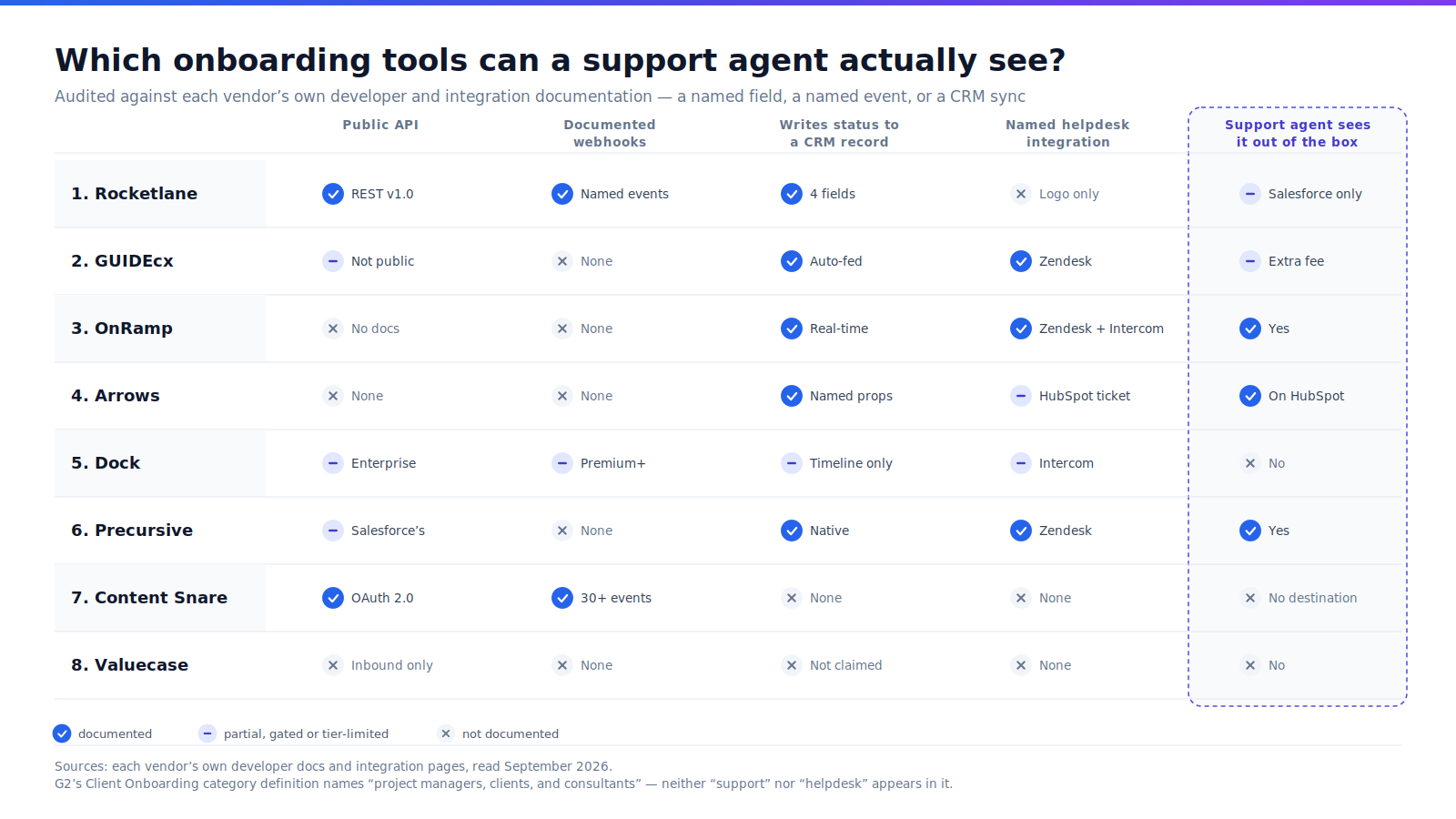
Why don't client onboarding tools talk to the helpdesk?
Because the category was never defined to include support. You can read it straight off G2's own listing criteria. G2's Client Onboarding category defines the software as enabling "project managers, clients, and consultants to collaborate on implementation tasks" — and neither the word "support" nor "helpdesk" appears anywhere in that definition or in the seven criteria a product must meet to be listed, per G2's category page. By contrast, G2's Customer Success category explicitly requires health scoring that combines "product usage, engagement, support interactions, commercial data, and historical data."
So the support team is written into the customer success category and written out of the onboarding category. Three vendors named a helpdesk anyway; the category never asked them to.
Why it matters is a number onboarding vendors publish about themselves and rarely dwell on. 56% of onboarding and implementation professionals said low visibility into project progress was the biggest cause of customer escalations, in Rocketlane's State of Customer Onboarding 2022, a survey of 100+ practitioners at companies including Intuit, Microsoft, Stripe and Braze. The same survey found 60% of respondents using four to six different tools to run onboarding.
An escalation is a support event. If the biggest driver of escalations is that nobody can see progress, then onboarding visibility is a support metric wearing a project-management badge.
"I would contend that the handoff from OnBoarding to Customer Success is THE most critical of all the handoffs." — Dan Steinman, then GM of Gainsight EMEA, Gainsight blog, January 2014
That was written twelve years ago. Gainsight's glossary still lists support ticket volume as a way to measure onboarding success, and still attaches no benchmark to it. We looked for one — across Zendesk's CX Trends, Intercom's 2026 Customer Service Transformation Report, Gainsight, ChurnZero and Freshworks — and found no published dataset measuring first-90-day ticket volume against steady state. Anyone who quotes you one is quoting something that does not exist.
Where the tickets go after go-live — and where Aissist.io fits
Aissist.io is not client onboarding software and is not ranked in this list. It is an AI operational layer that sits on the helpdesk a company already runs and resolves service and sales conversations end to end. We include one section on it because the bias disclosure at the top of this page is worth more if we are specific about where our interest lies: the eight platforms above manage the go-live, and Aissist.io works on the queue that go-live produces.
The handoff problem is a real operational cost regardless of which tool you buy. A newly live customer asks questions a long-tenured customer never asks — about the import that half-finished, the field that did not map, the permission nobody set — and they ask them of whoever answers first. If the onboarding plan lives in a tool your support desk cannot read, the agent answers from scratch.
Two of the eight platforms above make that fixable today: Arrows, by writing "Plan status" and "Task completion percentage" onto a HubSpot Ticket, and OnRamp, by syncing milestones to Salesforce or HubSpot while also integrating Zendesk and Intercom. Once that status is a field on a record, it becomes usable context — for a human agent, for a routing rule, or for an AI agent deciding whether a question is a bug or an unfinished setup step.
Aissist.io's published figures, labelled vendor-published like every other vendor figure on this page. The Aissist.io AI customer service benchmark puts the tier-1 automation median, from Aissist's research on customers' support data before they deployed Aissist, at roughly 41%, with a top quartile near 59%, cross-industry CSAT at 78/100, and all-in cost at about $5 per AI resolution against roughly $30 for a human-resolved B2B ticket — both cost figures from that same page. It also states that new deployments "typically launch at 40–50% and improve by roughly a point per month as workflows and documentation mature," which is an honest way of saying AI support has a ramp too, just one measured in points per month rather than weeks to go-live. Aissist.io's pricing is metered at $0.2–$0.6 per resolution with 1,000 free tickets a month and no contract, and its AI operational layer page claims a G2 rating of 4.8/5, which we have not independently verified against g2.com as we did for the eight platforms above.
The difference in shape is the point, and it is a fair contrast rather than a favourable one: onboarding platforms are bought as an implementation project with a seat count, while a metered layer on an existing helpdesk starts on eligible volume and earns the rest. Neither removes the other. For the longer version of how that ramp actually runs, we wrote about moving AI pilots into production and about building a hybrid human-plus-AI team. For teams already on HubSpot, the Aissist.io HubSpot integration is where the two halves meet.
How to choose the right client onboarding platform
Pick on the integration you need and the seat count you will actually have in a year, not on the feature grid. Eight rules, in the order they usually decide it:
If you run HubSpot and want your service team to see onboarding progress, choose Arrows, because it writes named properties like "Plan status" and "Task completion percentage" directly onto HubSpot Deal or Ticket records — no other platform here puts progress on the object a support agent already has open.
If you run Salesforce and more than thirty people touch delivery, choose Precursive, because native architecture removes the sync problem rather than solving it: the records live in your org, readable by every report, Flow and BI connector you already point at Salesforce.
If your support desk is Zendesk or Intercom, choose OnRamp, because it is the only platform in this comparison that names both as integrations and syncs onboarding milestones to the CRM in real time. Budget from $15,000.
If the customer's experience of onboarding is the thing you are selling, choose GUIDEcx, because it is the only one whose portal embeds inside your own product — and ask for the embed fee in writing, since it sits in the Advanced tier otherwise.
If implementation is billable work with utilisation targets, choose Rocketlane, because it treats margin, resourcing and time tracking as first-class, and it publishes the clearest webhook contract and the deepest compliance documentation of the eight.
If you want to start free and the same workspace should carry the deal and the go-live, choose Dock, because the free tier is real and external collaborators never pay — but price Premium if you need webhooks, because that is where they start.
If your onboarding bottleneck is documents rather than tasks, choose Content Snare, because $35/month, unlimited no-login clients and thirty named webhook events beat a project tool you would only use to chase attachments.
If you are a European team of one to four seats and ISO 27001 matters more than integrations, choose Valuecase, because it is the cheapest credible start here — and re-run the maths before you add a fifth seat, because each internal user is charged separately.
If procurement requires a published per-tier price, cross GUIDEcx, OnRamp, Arrows and Precursive off the list before you demo anything, because all four gate tier pricing behind a sales conversation.
What is client onboarding software, and how is it different from implementation and customer success?
Client onboarding software manages post-sales service delivery so internal teams and customers can collaborate on implementation tasks, track progress and spot bottlenecks — G2's own category definition. The three terms buyers use interchangeably are not interchangeable:
- Client onboarding is the coordinated handover from signed contract to a customer who can use what they bought. It is the whole relationship-level process, and it ends when the customer is live.
- Implementation is the technical work inside onboarding: configuration, data migration, integration, testing. Implementation is a workstream; onboarding is the process containing it. Some tools here are honest about which they do — Precursive and Rocketlane are professional services automation platforms that happen to run onboarding.
- Customer success starts once the customer is live and runs for the life of the account: adoption, health scoring, renewal, expansion. G2's Customer Success category requires health models combining product usage, engagement and support interactions — data that only exists after go-live.
The practical test: if the work ends when the customer is live, it is onboarding. If it ends when the project is technically complete, it is implementation. If it never ends, it is customer success.
Why the distinction decides your shortlist. Buy customer success software for onboarding and you get health scores for a customer who has no usage history yet. Buy onboarding software for customer success and you get a project that closes on a customer who is only starting. And buy either without checking whether it publishes status where your other systems can read it, and you will have bought the third thing: a second place to look.
One more definitional point is worth owning, because it is where most onboarding projects quietly fail. "Go-live" is not a milestone the software can define for you.
"What does 'go-live' even mean? Turning on a feature? Sending an email? That doesn't prove impact." — Lisa LaVan, Director of Service Delivery, Firstup, speaking at Propel25
LaVan's team reported a 25% decrease in time to value and a 12% increase in CSAT after defining go-live as an engagement threshold rather than a switch being flipped. That is the difference between a plan that closes and a customer who is actually running. For the measurement discipline behind that, our write-up on metrics-driven AI transformation covers how to instrument it.
This matters more than it used to, because delivery is getting harder rather than easier. On-time delivery across the professional services industry averages 70.6% and client NPS fell from 63.5 to 56.0 in a year, per the 19th Professional Services Maturity Benchmark from SPI Research, covering 509 organisations and $63 billion in services revenue, as summarised by Rocketlane. Roughly three in ten projects land late. Buyers noticed before the vendors did: 63% of customers said the level of post-sale support they expect is an important consideration in whether they buy at all, in Wyzowl's 2020 onboarding survey of 216 respondents.
Frequently asked questions
What is the best client onboarding software in 2026?
Rocketlane leads this comparison for professional services teams that bill for implementation, on the balance of documented integration access, compliance depth and review standing. For HubSpot shops, Arrows is the better answer; for Salesforce-standardised teams, Precursive. There is no single winner — the CRM you run decides more than the feature list.
How much does client onboarding software cost?
Published rates run from a free tier and $35 USD/month for Content Snare up to $15,000 for OnRamp, read September 2026. A twelve-person team pays roughly $2,580 to $15,000+ a year at list prices. Four of the eight — GUIDEcx, OnRamp, Arrows and Precursive — publish no per-tier price on their own site.
Which client onboarding tool integrates with Zendesk?
OnRamp, GUIDEcx and Precursive name Zendesk as a documented integration; OnRamp is the only one of the eight naming both Zendesk and Intercom. Rocketlane shows a Zendesk logo with no supporting documentation, Dock lists Intercom as an embed, and Content Snare, Valuecase and Arrows document no helpdesk connector.
Can my support team see where a customer is in onboarding?
Five of these eight write onboarding status onto a CRM record, but only OnRamp, GUIDEcx and Precursive also name a helpdesk integration. Arrows reaches support differently, writing "Plan status" onto HubSpot's Ticket object. Rocketlane writes four named fields to Salesforce but documents no helpdesk integration at all.
What is the difference between client onboarding and customer onboarding software?
They describe the same category, and vendors use both labels interchangeably. "Client onboarding" is more common in professional services, accounting and agencies; "customer onboarding" in B2B SaaS. G2 lists a Client Onboarding category and no Customer Onboarding category, so the platforms sit together regardless of which word a vendor prefers.
Is client onboarding software the same as project management software?
No. Client onboarding software adds a customer-facing view, external-stakeholder task assignment and white-label branding to project tracking — three of G2's seven listing criteria for the category. A team can run onboarding in Asana or Jira, but the customer gets no portal, no self-serve status and no place to complete their own tasks.
Do customers have to pay or create a login to use the portal?
Customer-side access is free on every platform here that publishes its terms, but login requirements differ. Dock, Content Snare and Valuecase all state that customers need no account — Valuecase's phrasing is "no account, no IT ticket." Rocketlane includes unlimited customer members; Arrows, GUIDEcx, OnRamp and Precursive do not publish external-user licensing terms.
How long does it take to implement client onboarding software?
Four vendors publish a claim, though Arrows' refers to its sales product: GUIDEcx says "most teams are fully live within 45 days or less," OnRamp "within around 30 days of signing," Valuecase "go live in days," Arrows "days, not quarters." All are vendor claims unattributed to customers. Content Snare, Dock and Valuecase offer self-serve trials, which is the more reliable signal.
Does onboarding quality really affect churn?
The published evidence is suggestive rather than conclusive, and most of it comes from vendor surveys rather than independent research. OnRamp's 2026 survey of 161 leaders found 57% of companies that reduced onboarding investment saw churn rise within six months. No independent dataset we could find quantifies the link.
What onboarding metric should I actually track?
Track escalations during and immediately after onboarding, alongside time-to-first-value. Gainsight's glossary lists support ticket volume as an onboarding success metric but attaches no benchmark, and no published dataset measures first-90-day ticket volume against steady state — so measure your own baseline before you buy.
Onboarding status is a stack problem, not a project-management problem
Onboarding status is a stack problem because the tool that records it and the tool your customer contacts are almost never the same system. Five of these eight write status onto a CRM record, only three of those also name a helpdesk, one writes an activity timeline instead of a field, and two keep it inside the tool entirely. That distribution, not the feature grid, is what separates them.
Every platform in this comparison will run a better onboarding than a spreadsheet, and they differ less on project management than their marketing suggests. They differ enormously on where the status ends up. That is the decision you are actually making.
So pick the tool that matches the CRM you already run and the seat count you will have in a year — Arrows for HubSpot, Precursive for Salesforce, OnRamp if the helpdesk matters most, Rocketlane if implementation is billable work, Dock or Content Snare if you want to start small and cheap. Then price the tier that includes the integration rather than the one on the pricing page, because in this category the read path is almost always sold one tier up, and check what the host platform underneath costs before you sign.
The escalations your onboarding produces will land on a support queue either way. Whether the agent answering them knows the customer went live on Tuesday is a configuration choice you make before you sign, not after.
The escalations land on your queue either way. Aissist.io resolves service and sales conversations end to end on the helpdesk you already run, metered per resolution with 1,000 free tickets a month. See the benchmark →
Changelog
- September 2026 — First published. Eight platforms assessed against six criteria; all pricing, G2 and Capterra ratings, integration lists and developer documentation verified 15–21 September 2026. Baton excluded following its June 2024 acquisition by ClientSuccess. Noted Arrows' 2026 repositioning toward AI sales execution and the move of its pricing from published tiers to quote-only. Recorded three vendor claims we could not reconcile with their own cited sources: Rocketlane's Gamify percentage (homepage 86% vs case study 82%), Valuecase's G2 claim (4.9 claimed vs 4.7 live), and Precursive's "5-star" claim (G2 shows 4.2). Next scheduled refresh: February 2027.