The 6 Best AI Coding Tools in 2026
The best AI coding tools in 2026 are Claude Code, OpenAI Codex, Cursor, GitHub Copilot, Google Antigravity and CodeRabbit. Which one is right turns on a question most comparison pages skip: what is the billing unit? Four different units appear across these six products — per seat with metered token overage, per seat with purchasable credits, per seat with on-demand usage at API rates, and flat per developer — which is why a $10 seat and a $40 seat can produce the same invoice, and why "from $20/month" tells you almost nothing. This guide compares all six on verified prices, agentic depth and real G2 scores, and normalises the billing unit so the numbers are actually comparable.
Reviewed by Rob Jiang, Chief AI Engineer. Disclosure: this guide is published by Aissist.io. We build agentic AI for customer service and sales — we do not sell a developer tool, we have no entry in this list, and we hold no affiliate or referral relationship with any company named here. Prices were read from vendor pricing pages on 21 August 2026; G2, Capterra and Gartner ratings were read in August 2026.
TL;DR: Six AI coding tools are worth paying for in 2026. They differ less in raw model quality — most of them run the same frontier models — than in how they deploy, what they cost once agents start running, and whether anyone has certified them.
- Best for deep agentic work in large codebases: Claude Code — $17/mo Pro, $20/seat/mo on team plans
- Best for delegating parallel tasks across surfaces: OpenAI Codex — included in ChatGPT Plus at $20/mo
- Best for IDE-first daily development: Cursor — $20/mo Pro, $40/seat/mo Teams
- Best for standardising an organisation without changing editors: GitHub Copilot — $10/mo Pro, $19/seat/mo Business
- Best for frontier agents at zero seat cost: Google Antigravity — free for individual developers
- Best for automated code review as a merge gate: CodeRabbit — $24/developer/mo billed annually
The biggest buying trap in this category is the sticker price. Every tool here bills agentic work by token consumption underneath the subscription, so the seat fee describes a floor, not a bill — and the "free" open-source harnesses are the least free of all, because you pay the model provider directly.
How we compared these AI coding tools
We scored six tools across five criteria, 0–5 each, and required at least 17 of 25 to be listed. The rubric:
- Agentic depth — can the tool plan, edit multiple files, run commands, execute tests and iterate on failure without a human keystroke per step?
- Deployment surface — does it sit on top of the stack you already run, or does it require you to migrate editors, hosts or workflows?
- Cost transparency — is the billing unit published, is included usage quantified in real numbers, and can a buyer forecast a monthly bill before signing?
- Evidence quality — are performance claims backed by an independent evaluation or a published protocol, or only by vendor marketing?
- Governance posture — SOC 2 and ISO status, default training policy, retention, self-hosting, and admin controls.
Here are the scores, so you can disagree with them.
| Tool | Agentic depth | Deployment surface | Cost transparency | Evidence quality | Governance | Total |
|---|---|---|---|---|---|---|
| Claude Code | 5 | 5 | 2 | 5 | 4 | 21/25 (84%) |
| OpenAI Codex | 5 | 5 | 3 | 4 | 4 | 21/25 (84%) |
| GitHub Copilot | 4 | 5 | 4 | 3 | 5 | 21/25 (84%) |
| CodeRabbit | 4 | 5 | 5 | 3 | 4 | 21/25 (84%) |
| Cursor | 5 | 3 | 2 | 4 | 4 | 18/25 (72%) |
| Google Antigravity | 5 | 4 | 3 | 3 | 2 | 17/25 (68%) |
Pricing was read directly from each vendor's live pricing page on 21 August 2026 and is stamped with that date in every entry. Every performance figure carries a provenance label: vendor-claimed, third-party leaderboard, or independently evaluated. Where a vendor publishes benchmark results only as images, or publishes no number at all, we say "not published" rather than borrowing a figure from a competitor's blog.
Our bias, stated plainly: Aissist.io builds agentic AI for customer service and sales operations, not developer tooling, so we have no product to rank first. What we do have is an opinionated view of what separates a real agent from an autocomplete engine, and that view shapes criterion 1. The limitation worth disclosing is that this comparison is built on primary-source documentation and vendor pricing pages read in August 2026, not on months of hands-on use of all six.
Who did not make the cut, and why. Cline, Aider, OpenCode and RooCode are capable open-source harnesses, but they are model-agnostic shells rather than products with published pricing, support terms or compliance posture — they belong in a different comparison. Devin Desktop is a credible entry we did not score for this edition: Cognition renamed Windsurf to Devin Desktop in June 2026, and the rename is recent enough that we will assess it properly at the January 2027 refresh rather than score a product mid-transition. Replit and v0 target prototyping rather than production engineering.
The 6 AI coding tools at a glance
| Tool | Best for | Technology | Billing unit | Entry price for agentic use | Deploys onto existing stack | G2 (Aug 2026) |
|---|---|---|---|---|---|---|
| Claude Code | Deep agentic work in large codebases | Agentic | Per seat + metered token overage | $17/mo (Pro, annual) | Yes — terminal, IDE plugin, CI | 4.7 (112) |
| OpenAI Codex | Parallel delegated tasks | Agentic | Per seat + purchasable credits | $20/mo (ChatGPT Plus) | Yes — CLI, IDE extension, GitHub/GitLab | 4.7 (19) — thin sample |
| Cursor | IDE-first daily development | Agentic | Per seat + on-demand usage at API rates | $20/mo (Pro) | No — replaces your editor | 4.6 (315) |
| GitHub Copilot | Org-wide standardisation | Hybrid (autocomplete + agent) | Per seat + AI credits (1 credit = $0.01) | $10/mo (Pro) | Yes — 12+ editors and github.com | 4.4 (394) |
| Google Antigravity | Frontier agents at zero seat cost | Agentic | Free quota; enterprise per seat | $0 for individuals | Partial — desktop app or IDE extension | No listing |
| CodeRabbit | Automated code review | Agentic (review-scoped) | Per developer, flat | $24/dev/mo (Pro, annual) | Yes — bot on your Git host | 4.4 (113) |
The billing-unit column is the one to read first. Four different units appear across six products, which is why headline prices are not comparable and why the worked cost example below matters more than any of them.
Who each one is built for
| Tool | Best-fit team | Surfaces | Where it runs | Time to first agent run | Stated security & compliance |
|---|---|---|---|---|---|
| Claude Code | Mid-market to enterprise; large legacy codebases | Terminal, VS Code, JetBrains, desktop, web, iOS/Android, Slack, Chrome | GitHub Actions, GitLab CI/CD, local, Bedrock, Vertex, Foundry | Minutes | SOC 2 Type I & II, ISO 27001:2022, ISO 42001:2023, HIPAA-ready with BAA; no training on commercial terms; ZDR by request only |
| OpenAI Codex | SMB to enterprise already on ChatGPT Business/Enterprise | CLI, VS Code/Cursor/Windsurf extension, desktop, web, iOS, Slack | GitHub, GitLab (beta), OpenAI-managed cloud sandbox | Minutes | SOC 2 Type 2; no training by default; 30-day retention; ZDR on request; Compliance API |
| Cursor | Product teams willing to standardise on one editor | Desktop editor, CLI, cloud agents, iPad, Slack, Teams, Jira, Linear | GitHub, GitLab, Bitbucket, Azure DevOps, Cursor Origin | Minutes | SOC 2 Type II, GDPR, CCPA; privacy mode; ZDR agreements with model providers; ISO 27001 not published |
| GitHub Copilot | Enterprises with mixed editors and a governance requirement | VS Code, Visual Studio, JetBrains, Neovim, Xcode, Eclipse, github.com, CLI, mobile | GitHub-hosted repos; Azure DevOps for review (preview) | Minutes | SOC 1 & 2 Type 2, ISO/IEC 27001:2022, CSA STAR Level 2, PCI DSS AoC; conditional IP indemnity; no training on Business/Enterprise data |
| Google Antigravity | Individuals and cost-sensitive teams; Google Cloud shops | Antigravity desktop app, CLI, VS Code/JetBrains/Zed extensions, Python SDK | Local, Google Cloud via Gemini Enterprise | Minutes | Antigravity itself carries no SOC or ISO certification per Google's own compliance matrix; Gemini Code Assist holds ISO 27001/27017/27018/27701 and SOC 1/2/3 |
| CodeRabbit | Any team where PR review is the bottleneck | Git host bot, VS Code/Cursor/Windsurf extension, CLI, Slack, Discord, Jira, Linear | GitHub, GitLab, Bitbucket, Azure DevOps; self-hosted at 500+ seats | Under an hour | SOC 2 Type II, ISO 27001, GDPR; never trains on customer code; code still reaches OpenAI/Anthropic in every mode |
1. Claude Code — best for deep agentic work in large codebases
Claude Code is Anthropic's agentic coding tool, built to read a codebase, edit files, run commands and verify its own work, deployed as a terminal CLI with matching extensions for VS Code and JetBrains, a desktop app, a browser and mobile surface, GitHub Actions and GitLab CI integrations, and an agent SDK.
Technology: Agentic — it plans multi-step work, executes shell commands, spawns subagents and runs unattended in CI, with no autocomplete surface at all. Deploys onto: your existing editor and CI; it does not replace them. Surfaces: terminal, VS Code, JetBrains, desktop, web, iOS, Android, Slack, Chrome, GitHub Actions, GitLab CI/CD, SDK. Actions: multi-file edits, shell execution, test runs, branch creation, commits, pull requests, MCP tool calls, scheduled background jobs.
Performance: Claude Code with Claude Fable 5 tops the Terminal-Bench 2.1 leaderboard at 83.8% ± 1.2% — third-party leaderboard, tbench.ai, read 21 August 2026, but note the entry was submitted by Anthropic on 7 June 2026, so read it as a vendor run scored on a neutral leaderboard rather than an independent evaluation. OpenAI separately claims 88.8% on the same benchmark for GPT-5.6 Sol without filing a leaderboard entry, so treat the ranking as contested. Claude Opus 5 ranks first of 86 models on SWE-bench Verified at 97.00% — independently evaluated by Vals AI, leaderboard updated 19 August 2026. Anthropic itself publishes its launch benchmarks as charts rather than text, so no vendor-stated absolute SWE-bench number exists for Opus 5.
G2: 4.7 (112 reviews), read August 2026 · Cost: Free tier included; Pro $17/mo billed annually or $20 monthly; Max $100 or $200/mo; Team Standard $20/seat/mo annual, Team Premium $100/seat/mo annual; Enterprise $20/seat/mo plus usage at API rates, billed annually. Overage bills at API rates through usage credits, capped at $2,000 redeemed per day. Read from claude.com/pricing, 21 August 2026.
Pros:
- Holds the top slot and three of the top ten on the Terminal-Bench 2.1 leaderboard, and pairs with the model an independent evaluator ranks first of 86 on SWE-bench Verified.
- One engine across ten-plus surfaces, with
CLAUDE.md, permissions and MCP servers applying identically everywhere and sessions moving between terminal, desktop and web. - A 1M-token context window at no token premium above 200K on Max, Team and Enterprise plans.
Cons:
- Usage limits are not published as numbers, only as relative multipliers, and they have visibly moved: The Register reported on 5 January 2026 that developers were hitting caps "within 10–15 minutes," with one source claiming a roughly 60% reduction. Anthropic's on-record response was that limits had been doubled as a promotion from 25 to 31 December 2025 and that users were seeing the return to baseline — a fair rebuttal, and also an illustration of why unpublished limits are hard to plan around.
- A documented billing defect opened 1 April 2026 describes prompt-caching bugs producing 10–20× token cost inflation across paid tiers.
- Zero data retention is not part of the standard Enterprise plan — it is enabled per organisation by an account team — and session transcripts are stored locally in plaintext for 30 days by default.
Our take: If your problem is a million-line repository nobody fully understands, this is the strongest tool on the list, and an independent SWE-bench evaluation backs that rather than a vendor deck. Do not pick it if you need a fixed, forecastable monthly bill or a graphical editor as the primary surface. Rakuten's Kenta Naruse, a machine learning engineer, described a seven-hour autonomous run in Anthropic's case study: "I didn't write any code during those seven hours. I just provided occasional guidance."
2. OpenAI Codex — best for delegating parallel tasks across surfaces
OpenAI Codex is an agentic software-engineering product that takes delegated coding tasks and executes them end-to-end, deployed as a terminal CLI, an extension for VS Code-family editors, macOS and Windows desktop apps, a ChatGPT web surface, an OpenAI-managed cloud sandbox, and bots inside GitHub, GitLab and Slack.
Technology: Agentic — it runs a plan-act-observe loop with tool use inside an OS-enforced sandbox. Deploys onto: your existing editor and Git host; there is no OpenAI code editor. Surfaces: CLI, VS Code/Cursor/Windsurf, desktop, web, iOS, Slack, GitHub, GitLab (beta since 19 August 2026). Actions: file edits, sandboxed shell execution, test runs, pull requests, PR and MR review, parallel background cloud tasks, scheduled automations.
Performance: GPT-5.6 Sol scores 64.6% on SWE-Bench Pro and 88.8% on Terminal-Bench 2.1 — both vendor-claimed, OpenAI, 9 July 2026; the Terminal-Bench figure is not filed on the public leaderboard, where Claude Code leads at 83.8%. GPT-5.3-Codex scores 77.3% on Terminal-Bench 2.0 — vendor-claimed, OpenAI, 5 February 2026. The last SWE-bench Verified figure OpenAI published for a Codex model is 77.9% for GPT-5.1-Codex-Max in November 2025; the company has since switched to SWE-Bench Pro, so no current-model SWE-bench Verified number exists. GPT-5.6 Sol scores 61 on the Artificial Analysis Intelligence Index — independent leaderboard, read 21 August 2026.
Context: the GPT-5.6 family exposes a 1,050,000-token window on the API, but Codex itself operates the models at 272K following a reduction from 372K in July 2026 — materially smaller than Claude Code's or Antigravity's 1M.
G2: 4.7 (19 reviews), read August 2026 — too thin a sample to weigh heavily · Cost: included in ChatGPT Plus $20/mo, Pro $100 or $200/mo, Business $20/user/mo annual ($25 monthly), Enterprise custom. Local usage is capped per rolling five-hour window — 10 to 100 GPT-5.6 Sol messages on Plus — with additional weekly limits that are not published as numbers. Credits are purchasable at roughly 50 credits per dollar. API rates: Sol $2.50 in / $15 out per million tokens, rising to $5.00 / $22.50 above a 272K prompt; Luna is $0.20 / $1.20. Read from learn.chatgpt.com/docs/pricing and developers.openai.com/api/docs/pricing, 21 August 2026.
Pros:
- The widest surface coverage in the category — terminal, IDE, desktop, web, iOS, Slack, GitHub and GitLab — all on one subscription.
- The lowest frontier-class token rates in this comparison: GPT-5.6 Sol at $2.50 in / $15 out per million tokens, and Luna at $0.20 / $1.20 for cheaper agent runs.
- OS-level sandboxing is the default, not an option: Seatbelt on macOS,
bwrapplusseccompon Linux, network access off unless explicitly enabled, with admin-enforceable policy files.
Cons:
- Quota consumption has regressed in production: from around 10 May 2026 users reported five-hour limits exhausting in one to two hours, and OpenAI's status page acknowledged "Increase in users hitting Codex rate limits" before marking it recovered on 23 May 2026.
- Windows is a second-class platform, with open sandbox regressions on the official repository including issue #27125, a sandbox helper missing in CLI 0.138.0.
- Model retirement runs on a short clock — GPT-5.4 and GPT-5.4 mini leave Codex on 31 August 2026 for ChatGPT sign-in users.
Our take: Choose Codex when the work pattern is "hand off five tasks, review five pull requests," because the cloud sandbox and the GitHub and Slack entry points make delegation cheap. Do not pick it if your team is Windows-first or if you need a stable model roster you can pin for a year. Tres Wong-Godfrey, a tech lead at Cisco Meraki, described the pattern: "With Codex, I offloaded the refactoring and test generation while focusing on other priorities."
3. Cursor — best for IDE-first daily development
Cursor is an AI code editor and coding-agent platform from Anysphere, built to help engineers write, refactor and review code across a whole repository, deployed as a standalone desktop editor forked from VS Code plus a CLI, cloud agents on the web, iPad apps, and chat and issue-tracker integrations.
Technology: Agentic with a retrieval layer — the agent runs uncapped tool-call loops over an embeddings index of your repository. Deploys onto: nothing; it replaces your editor, which is the central trade-off. Surfaces: desktop editor, CLI, cloud agents, iPad, Slack, Teams, Jira, Linear, JetBrains and Xcode plugins. Actions: multi-file edits, shell execution, browser control for visual verification, scheduled and event-driven cloud agents, isolated subagent VMs, agentic PR review via Bugbot.
Performance: Cursor publishes CursorBench 3.2, a live leaderboard of 56 model configurations updated 11 August 2026, on which Grok 4.6 leads at 70.8% and Cursor's own Composer 2.5 sits at 56.1% — vendor-published, cursor.com/evals, and notably self-unflattering. Cursor's Composer 2 technical report claims 73.7% on SWE-bench Multilingual and 61.7% on Terminal-Bench — vendor-claimed. A vendor study co-authored with Suproteem Sarkar, an assistant professor of finance and applied AI at the University of Chicago, found companies merge 39% more pull requests after enabling agent mode, with no significant change in revert rates — vendor telemetry, 11 November 2025, not independent. Cursor does not publish a context window figure for any model.
G2: 4.6 (315 reviews), read 21 August 2026 · Cost: Hobby free; Pro $20/mo including $20 of third-party model usage; Pro+ $60/mo including $70; Ultra $200/mo including $400; Teams Standard $40/user/mo, Teams Premium $120/user/mo; Enterprise custom. Beyond the included allowance you either add on-demand usage at model API rates or upgrade. Read from cursor.com/docs/account/pricing, 21 August 2026 — the public pricing page does not render the Pro+ and Ultra figures.
Pros:
- The largest verified enterprise deployment in the category: NVIDIA reports 30,000 employees using Cursor daily and 3× more code committed, in a case study published 6 February 2026 with named NVIDIA engineers on record.
- Its first-party Composer 2.5 model bills at $0.50 in / $2.50 out per million tokens, roughly a twentieth of frontier-model output pricing inside the same product.
- It publishes a live leaderboard that ranks competitors above its own model — a checkable disclosure no other vendor here makes.
Cons:
- Included usage for Cursor's own models is described only as "generous included usage," with no request count, token count or dollar value, so buyers cannot forecast when they will hit a limit. G2's aggregated feedback independently flags a desire for "clearer visibility into token consumption per request."
- Cursor publicly apologised on 4 July 2025 for a June 2025 pricing change it admitted "was not communicated clearly," and refunded three weeks of unexpected charges.
- G2 reviewers report RAM spikes while indexing large repositories, slowdowns on bigger projects, and context loss that produces overly broad changes.
- Ownership changed in 2026. SpaceX completed its all-stock acquisition of Anysphere at a $60 billion implied value on 14 August 2026, per the company's SEC Form 8-K. Treat roadmap and pricing continuity as an open question in any multi-year commitment.
Our take: Cursor is the best pure editing experience here and the safest bet if your engineers will actually adopt the tool, which is a real constraint. Do not pick it if your organisation cannot standardise on one editor, or if a seven-week-old change of ownership makes procurement nervous. NVIDIA's Fabian Theuring, a senior software architect, put the adoption case plainly: "We are using Cursor every day, and now there's no going back because it has completely changed the way software engineering works."
4. GitHub Copilot — best for standardising an organisation without changing editors
GitHub Copilot is Microsoft and GitHub's AI developer platform spanning inline completion, chat, in-IDE agent mode, an autonomous cloud agent and automated pull-request review, deployed as a subscription layer on top of twelve-plus existing editors, github.com, a CLI and mobile, rather than as a standalone environment.
Technology: Hybrid — it ships both a latency-optimised autocomplete path and full agentic execution in an ephemeral GitHub Actions environment. Deploys onto: every editor your team already uses, which is the whole argument for it. Surfaces: VS Code, Visual Studio, JetBrains, Neovim, Xcode, Eclipse, Azure Data Studio, github.com, CLI, mobile, Raycast. Actions: multi-file edits, terminal commands, issue-to-pull-request via the cloud agent, automated PR review, and — through Agent HQ — assigning work to Anthropic's Claude and OpenAI's Codex as native GitHub agents.
Performance: Microsoft reported 50 million Copilot users and that "one in three pull requests on GitHub now involves an agent" on its FY26 Q4 earnings call, 29 July 2026 — vendor-claimed. GitHub's frequently cited 55%-faster figure comes from a vendor-run 2022 trial on a single toy task (write an HTTP server in JavaScript, n=95) and should not be read as current. The most rigorous independent finding in this category cuts the other way: METR's randomised controlled trial of 16 experienced open-source developers across 246 real issues found they were 19% slower with AI tools while believing they were 20% faster — independent, 10 July 2025; note the participants used Cursor with Claude, not Copilot, so read it as evidence about the category, not about this product. GitHub publishes no SWE-bench score for its cloud agent.
G2: 4.4 (394 reviews); Capterra 4.5 (50 reviews), both read August 2026 · Cost — note the model changed on 1 June 2026, when premium request units were replaced by AI Credits at 1 credit = $0.01, consumed by token usage at published per-model API rates. Free $0; Pro $10/mo (1,500 credits, $15 of value); Pro+ $39/mo (7,000); Max $100/mo (20,000); Business $19/seat/mo (1,900); Enterprise $39/seat/mo (3,900). Credits do not roll over — unused allowance is forfeited at 00:00 UTC on the first of each month. Read from docs.github.com/copilot/get-started/plans, 21 August 2026.
Pros:
- The broadest editor coverage of any tool here, including Xcode, Eclipse and Neovim, so nobody has to migrate.
- Multi-vendor model choice inside one seat: Claude Opus 5, GPT-5.6, Gemini 3.1 Pro, Grok 4.6 and Kimi K3 are all selectable.
- It runs rivals' agents natively — Claude and Codex are assignable on Copilot Business and above through Agent HQ.
Cons:
- The June 2026 shift to token-metered credits produced documented bill shock. In GitHub's own community discussion, user @mtaheri8541 wrote on 1 June 2026: "In just two hours of regular development work today, I have already exhausted 8% of my monthly credits. At this rate, my 7,000-unit quota will be depleted in less than two days."
- Content exclusion — the enterprise control that keeps sensitive files out of the model — has documented holes: GitHub's docs state it does not apply to symlinks or remote filesystems and "aren't currently supported in Edit and Agent modes," which are exactly the modes that read most broadly. It is also Business and Enterprise only.
- The cloud agent has hard structural ceilings: a 59-minute maximum session, one branch per session, no simultaneous multi-repository changes, and GitHub-hosted repositories only.
Our take: Copilot wins on governance and reach rather than on raw agent capability, and for a 200-engineer organisation with five editors in play that is usually the deciding factor. Do not pick it if your repositories live outside GitHub or if you need agent sessions to run longer than an hour. Duolingo's Jonathan Burket, a senior engineering manager, framed the value as flow rather than speed: "GitHub Copilot stops you from getting distracted when you're doing deep work."
5. Google Antigravity — best for frontier agents at zero seat cost
Google Antigravity is Google's agent-first development platform, built to let developers delegate multi-step coding tasks to autonomous Gemini-powered agents that plan, edit code, run commands and drive a browser, deployed as a desktop application for Windows, macOS and Linux, a Go-based terminal CLI, extensions for VS Code, Visual Studio, JetBrains and Zed, a Python SDK, and Gemini Enterprise on Google Cloud.
Read this first: Gemini CLI is no longer the current consumer product. Google stopped serving free, AI Pro and AI Ultra requests through Gemini CLI and the Gemini Code Assist IDE extensions on 18 June 2026, transitioning those users to Antigravity CLI. Gemini CLI continues for organisations holding a Gemini Code Assist Standard or Enterprise licence and for paid API-key use. Several competing roundups still list it as a live consumer product.
Technology: Agentic — the /goal command runs an agent to completion without intermediate input, and Manager View orchestrates parallel subagents. Deploys onto: your existing editor if you use the extensions; the desktop app replaces it. Surfaces: Antigravity 2.0 desktop app, CLI, IDE extensions, Python SDK, Android Studio. Actions: file edits, shell execution, browser-in-the-loop debugging, parallel agent orchestration, isolated Git worktree mode, scheduled background tasks, and verification Artifacts — implementation plans, walkthroughs, screenshots and browser recordings. Native pull-request creation is not published as a capability.
Performance: Gemini 3.7 Flash scores 65.3% on DeepSWE v1.1 and 43.6% on FrontierCode 1.1 — vendor-claimed, Antigravity blog, 13 August 2026. It reaches 1588 Elo on WebDev Arena — third-party leaderboard, cited by the vendor, same date. No SWE-bench Verified figure is published for Antigravity, and no independent evaluation of the product itself was found.
G2: no listing; the legacy Gemini Code Assist product holds 4.4 (73 reviews) and Product Hunt shows 4.6 (19 reviews), both read 21 August 2026 · Cost: free for individual developers, with quota tiers that Google's plans page describes only as "meaningful," "generous" and "highest" — that page publishes no prices and no requests-per-day figures at all. Google AI Pro is $19.99/mo and Google AI Ultra starts at $100/mo. Gemini Code Assist bills hourly: Standard works out to roughly $19/user/mo on a 12-month commitment, Enterprise roughly $45 — cloud.google.com/products/gemini/pricing. API rates: Gemini 3.1 Pro $2 in / $12 out per million tokens up to a 200K prompt, rising to $4 / $18 above it; Gemini 3.7 Flash $0.75 / $3.75 through 31 December 2026 — ai.google.dev/gemini-api/docs/pricing. All read 21 August 2026.
Pros:
- Free for individual developers on Windows, macOS and Linux, with access to Gemini 3.1 Pro and unlimited tab completions — the only genuinely zero-cost frontier agent here.
- Multi-vendor model choice inside a first-party Google environment, including Claude Sonnet 4.6, Claude Opus 4.6 and GPT-OSS-120B.
- The cheapest frontier-class token pricing in the comparison, at $0.75 / $3.75 per million tokens for Gemini 3.7 Flash through the end of 2026.
Cons:
- Antigravity carries no SOC or ISO certification. Google's own Gemini Enterprise compliance matrix lists Antigravity as not supporting FedRAMP, IL4/IL5, ISO certifications or SOC 1/2/3 — materially weaker than Gemini Code Assist, which holds ISO 27001/27017/27018/27701 and SOC 1/2/3.
- Repeated prompt-injection-to-remote-code-execution vulnerabilities have been publicly disclosed, including a Strict Mode bypass found by Pillar Security researcher Dan Lisichkin, disclosed 7 January 2026 and patched 28 February 2026.
- The Gemini CLI deprecation was abrupt, Google conceded there would not be "1:1 feature parity right out of the gate," and hands-on testing found Antigravity CLI requires browser-based OAuth, which is hostile to headless CI.
Our take: For an individual developer or a startup watching burn, a free frontier agent from Google is genuinely hard to argue with, and the Artifacts model — plans, walkthroughs and browser recordings as verifiable output — is a real idea nobody else ships. Do not pick it for regulated work or anything touching customer data until the compliance gap closes. WPP's Callum Anderson, head of engineering, reported that integrating Antigravity "streamlined workflows, automated repetitive tasks and empowered engineering teams to deliver high-quality solutions for our clients, faster."
6. CodeRabbit — best for automated code review as a merge gate
CodeRabbit is a commercial AI code-review platform that performs context-aware review of pull requests — line-by-line comments, change summaries and one-click fixes — delivered as a bot installed onto existing Git hosts, plus IDE extensions and a CLI, with self-hosting reserved for large enterprise accounts.
Technology: Agentic within a review scope — frontier models orchestrated with retrieval over linked repositories plus deterministic linters, SAST and secret scanning, now extended with reusable Agent Skills and risk-based PR triage. Deploys onto: your existing review flow; it adds a reviewer, it replaces nothing. Surfaces: GitHub, GitLab, Bitbucket, Azure DevOps, VS Code, Cursor, Windsurf, CLI, Slack, Discord, Jira, Linear. Actions: line-by-line review, PR summaries and sequence diagrams, one-click fixes, static analysis, security and secret scanning, agentic chat, coding plans from issues, unit-test generation, merge-conflict resolution, thread approval and resolution.
Performance: CodeRabbit reports more than 2 million code reviews per week across 17,000+ customers and 150,000+ open-source projects — vendor-claimed, BusinessWire, 12 August 2026. Its own model benchmark on roughly 100 verified open-source error patterns puts its production baseline at a 61.1% full-stream pass rate — every comment class including low-confidence nitpicks — with 35.2% actionable precision — vendor-published, 24 July 2026. A competing vendor's benchmark scores it lower; because that benchmark is published by a direct rival, we do not cite it as independent. No neutral third-party accuracy benchmark is published.
G2: 4.4 (113 reviews); Gartner Peer Insights 4.2 (21 reviews), both read August 2026 · Cost: Free tier is summaries only — actual PR review requires a paid plan or the IDE/CLI path. Qualifying open-source projects get Pro+ features at no charge. Pro $24/developer/mo annual ($30 monthly); Pro+ $48 annual ($60 monthly); Enterprise custom. Fourteen-day Pro+ trial, no card required — docs.coderabbit.ai/management/plans. A Security add-on runs $40/user/mo — coderabbit.ai/pricing. Both read 21 August 2026.
Pros:
- The widest Git-host coverage of any dedicated reviewer — GitHub, GitLab, Azure DevOps and Bitbucket at general availability, where Greptile documents GitHub only and Copilot's review reaches Azure DevOps in public preview.
- Qualifying open-source projects receive the $48/developer Pro+ tier free; CodeRabbit states it has covered $5M-plus in review costs for open source since 1 February 2025.
- Flat per-developer pricing, so review volume does not change the bill — the only tool in this comparison whose cost is genuinely forecastable.
Cons:
- Self-hosting is gated at 500 or more seats, and even then review prompts and source code still travel to your configured LLM provider; there is no air-gapped mode.
- Review noise and tuning burden are recurring complaints — G2 reviewers cite feedback that is "overly cautious or misses project context," untuned installs generating excessive comments, and large pull requests taking 20-plus minutes, which is a problem when the check is a required merge gate.
- A 2025 supply-chain breach was material: Kudelski Security achieved remote code execution on CodeRabbit production via a malicious Rubocop config in a pull request, exfiltrating the GitHub App private key and gaining potential access to roughly one million repositories. Disclosed 24 January 2025, fixed 30 January 2025.
Our take: Code review is where AI-generated code either gets caught or gets shipped, and CodeRabbit is the most complete dedicated reviewer available — it belongs alongside one of the five agents above, not instead of one. Do not pick it if you need an air-gapped deployment or if your team will not invest the hours in .coderabbit.yaml tuning that keeps the noise down. CodePath's Nathan Esquenazi, CTO and co-founder, described the install as immediate: "CodeRabbit was easy to set up and instantly gave every pull request an AI summary of changes and a line-by-line code review."
What AI coding tools actually cost
Take a concrete scenario: 10 developers, one month, daily agentic use — meaning each engineer runs several multi-file agent tasks a day rather than accepting occasional completions. Here is what each tool bills before overage.
| Tool | Plan | Per seat / month | 10 developers | What happens when the included allowance runs out |
|---|---|---|---|---|
| Claude Code | Team Standard (annual) | $20 | $200 | Work stops unless usage credits are on; credits then bill at API rates with no fixed ceiling below $2,000/day. Enterprise is also $20/seat plus usage. |
| Claude Code | Team Premium (annual) | $100 | $1,000 | 5× the standard-seat allowance, then the same metered credits |
| OpenAI Codex | ChatGPT Business (annual) | $20 | $200 | Five-hour window resets, or the workspace buys credits at ~50 per dollar |
| Cursor | Teams Standard | $40 | $400 | On-demand usage at model API rates, billed in arrears |
| GitHub Copilot | Business | $19 | $190 | 1,900 credits ($19 of tokens) per user, no rollover, then overage at per-model API rates |
| Google Antigravity | Individual free tier | $0 | $0 | Quota refreshes on a five-hour or weekly cycle; Pro/Ultra subscribers can buy credits |
| CodeRabbit | Pro (annual), added alongside an agent | $24 | $240 | Nothing — flat rate, review volume does not change the bill |
The honest reading of that table is that the seat prices cluster between $190 and $400 a month for ten developers, and then diverge wildly based on token consumption that none of these vendors will forecast for you. GitHub is the most explicit about it: 1,900 credits is exactly $19 of tokens, and a single agentic pull request on a frontier model can consume a meaningful share of that. One user in GitHub's own community thread reported 822 credits — roughly $8.22 — spent on a single request.
Hidden costs to budget for. Overage is the obvious one and the largest. Beyond it: Copilot credits expire monthly with no rollover, so under-use is pure waste; Cursor's Max Mode carries a 20% surcharge over API rates and is restricted to legacy plans; Codex roughly doubles its token rate on any request above a 272K prompt; CodeRabbit's security scanning is a separate $40/user add-on; and Claude Code's Zero Data Retention, if your legal team requires it, is not in the standard Enterprise plan and has to be negotiated.
The "free" trap. Open-source harnesses such as Cline, Aider and OpenCode are free software running on paid models. The harness costs nothing; a heavy user on a frontier model can outspend a Cursor Ultra seat. Any comparison that files them under "free" is comparing a shell to a subscription.
How to choose the right AI coding tool
- If your codebase is large, old and poorly documented, then choose Claude Code, because an independent SWE-bench Verified evaluation ranks Claude Opus 5 first of 86 models, Claude Code leads the Terminal-Bench 2.1 leaderboard, and the 1M-token context is included rather than surcharged on team plans.
- If your team's work arrives as tickets and pull requests rather than editor sessions, then choose OpenAI Codex, because the cloud sandbox, GitHub, GitLab and Slack entry points make delegation the default interaction rather than an extra step.
- If your engineers will actually change editors, then choose Cursor, because the editing experience is the best here and NVIDIA's 30,000-seat deployment proves it scales.
- If your engineers will not change editors, then choose GitHub Copilot, because it is the only tool that covers Xcode, Eclipse, Neovim, JetBrains and Visual Studio from one seat and one admin console.
- If budget is the binding constraint, then choose Google Antigravity, because it is free for individual developers with frontier-model access — but not for regulated workloads, because Antigravity carries no SOC or ISO certification.
- If your bottleneck is review rather than authoring, then add CodeRabbit, because AI-generated code multiplies review load and a flat per-developer fee is the only forecastable line item in this category.
- If procurement requires a fixed monthly number, then avoid every per-token plan and negotiate an enterprise agreement with a spend cap, because published seat prices in this category describe a floor, not a bill.
- If you are standardising for more than 50 engineers, then run a two-week bake-off on your own repository before signing, because every benchmark cited on this page measures a public task set, not your code.
What is an AI coding agent, and how is it different from an AI coding assistant?
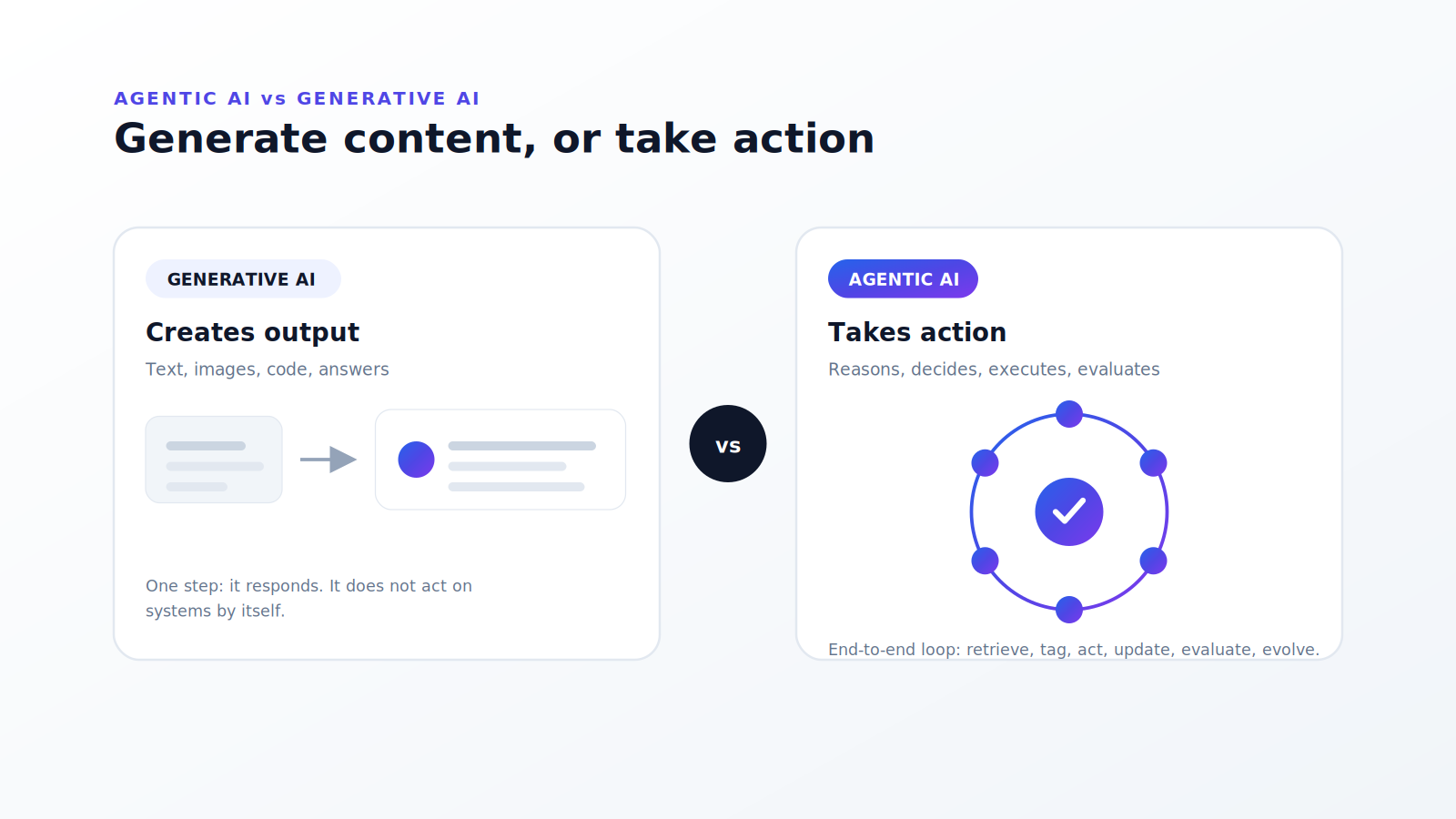
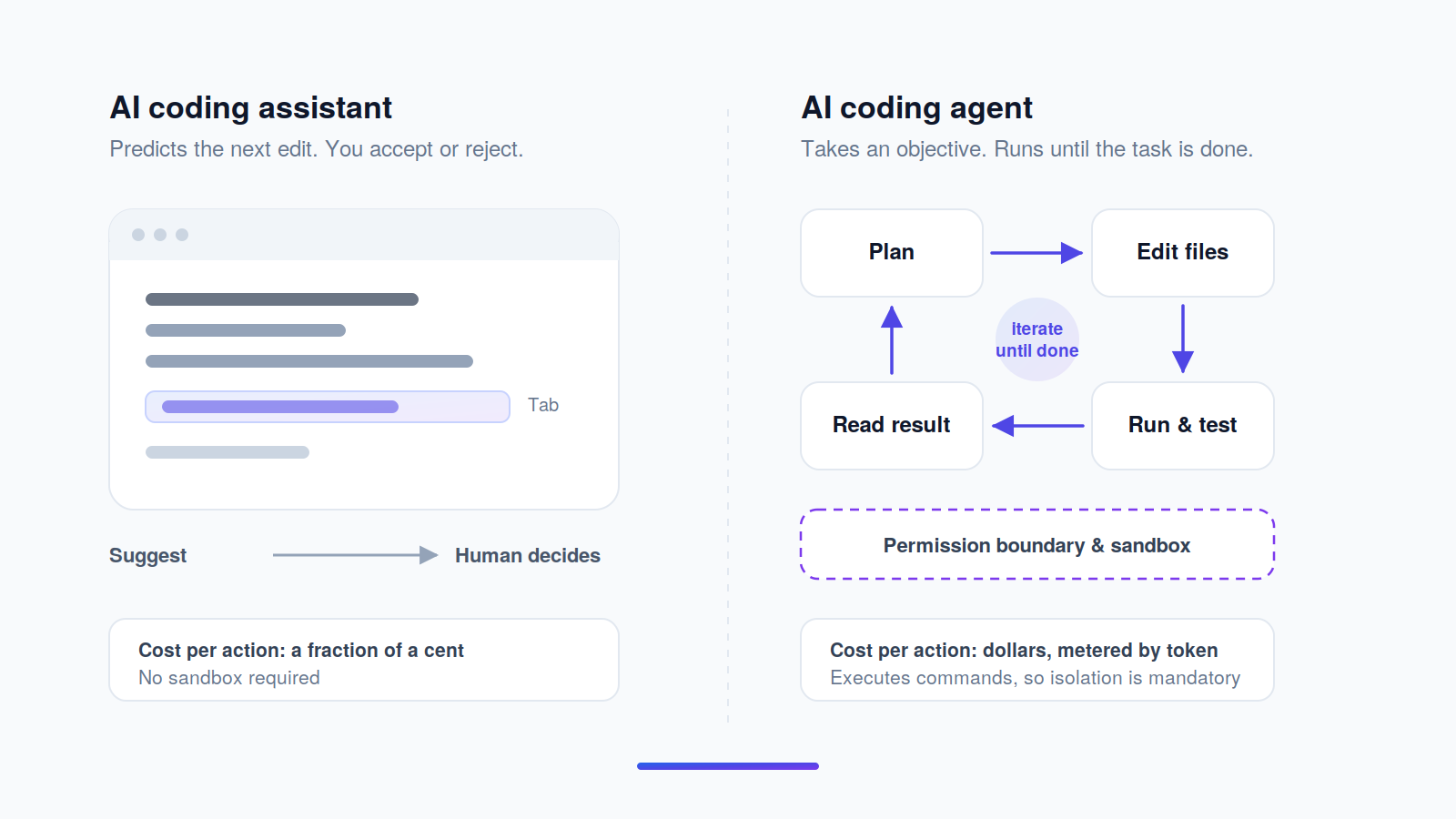
An AI coding assistant predicts the next edit; an AI coding agent completes the task. The assistant surfaces a completion you accept or reject, one suggestion at a time. The agent takes an objective, plans the steps, edits multiple files, runs the test suite, reads the failure, and tries again — and it does that inside a permission boundary you define, not inside your keystroke stream.
That distinction decides almost everything else in this comparison. It determines the billing unit, because a completion costs a fraction of a cent and an agent run costs dollars. It determines the security model, because a tool that only suggests text needs no sandbox and a tool that executes shell commands needs a strong one. And it determines what "context window" means in practice: an assistant needs the current file, while an agent needs enough of the repository to reason about consequences three files away.
The same architectural line runs through operational AI outside engineering. We draw it between systems that retrieve an answer and systems that reason across a multi-agent architecture to resolve a case end to end — the same difference between deflecting a ticket and closing it. The failure modes rhyme too: an agent that acts confidently on incomplete context is a problem whether it is refactoring a payment service or issuing a refund, which is why governance and ground truth matter more than raw model capability in both settings.
What the benchmarks do and do not tell you. SWE-bench Verified is a 500-instance, human-filtered subset of real GitHub issues where a model must produce a patch that passes the repository's own tests. Terminal-Bench measures whether an agent can complete tasks in a shell. Both are useful and both are narrow: they measure patch correctness on public Python-heavy repositories, not architectural judgement, not your internal conventions, and not whether the agent knows when to stop. Treat a leaderboard as a filter for the shortlist, then test on your own code — the same reason we argue elsewhere that evaluation has to be built into the system rather than borrowed from a public scoreboard.
Why the productivity numbers disagree. GitHub's vendor trial found 55% faster completion on a toy task in 2022. METR's independent randomised trial found experienced developers were 19% slower on real issues in their own repositories in 2025 — while believing they were 20% faster. Both are real results measuring different things. Greenfield code on an unfamiliar framework is where these tools shine; deep work in a repository you already know well is where the review overhead can exceed the generation saving. Budget accordingly, and measure your own team rather than trusting either figure.
Frequently asked questions
What does Cursor vs Claude Code vs GitHub Copilot actually cost per developer per month?
For ten developers on team plans read on 21 August 2026: GitHub Copilot Business is $19 per seat, Claude Code Team Standard is $20 per seat per month on an annual commitment, and Cursor Teams Standard is $40 per seat. All three then meter agentic usage on top at model API rates, so the real bill depends on how much your agents run. Copilot is the most explicit, granting exactly $19 of token credits per user with no rollover.
Are Cline, Aider and OpenCode really free?
No. The harness is free and open source; the model calls are not. You supply an API key and pay the model provider directly for every token the agent consumes, which on a frontier model during heavy agentic work can exceed a $200 Cursor Ultra seat. "Free" describes the software licence, not the monthly cost.
Which AI coding tools are SOC 2 certified, and which train on my code?
Claude Code (SOC 2 Type I and II, ISO 27001:2022, ISO 42001:2023), GitHub Copilot (SOC 1 and 2 Type 2, ISO/IEC 27001:2022), OpenAI Codex (SOC 2 Type 2), Cursor (SOC 2 Type II) and CodeRabbit (SOC 2 Type II, ISO 27001) all hold certifications. Google Antigravity does not — Google's own compliance matrix lists it as unsupported for SOC 1/2/3 and ISO. None of these vendors trains on business-tier data by default; consumer tiers differ, and Anthropic's consumer plans train only on opt-in.
What happened to Windsurf, and is Gemini CLI still supported?
Cognition renamed Windsurf to Devin Desktop in June 2026, so any 2026 roundup still listing "Windsurf" as a current product is out of date. Separately, Google stopped serving free, AI Pro and AI Ultra requests through Gemini CLI on 18 June 2026 and transitioned those users to Antigravity CLI; Gemini CLI continues for organisations holding a Gemini Code Assist Standard or Enterprise licence and for paid API-key use.
What is the difference between an AI coding assistant and an AI coding agent?
An assistant predicts your next edit and waits for you to accept it. An agent takes an objective, plans the work, edits multiple files, runs commands and tests, reads the results and iterates until the task is done or it hits a permission boundary. The practical difference is cost and risk: agents consume far more tokens and need a sandbox, because they execute rather than suggest.
Can I self-host an AI coding agent or keep my code inside my own cloud?
Partially. Claude Code runs through Amazon Bedrock, Google Cloud and Microsoft Foundry, keeping inference inside your cloud account. CodeRabbit offers self-hosting to enterprise customers at 500 or more seats, though prompts still reach your configured LLM provider. No tool in this comparison offers a fully air-gapped mode. If that is a hard requirement, the open-source harnesses paired with a self-hosted model are the only route.
Should I trust SWE-bench Verified scores when picking a tool?
Use them to build a shortlist, not to make the decision. SWE-bench Verified measures whether a model can patch real GitHub issues so the repository's own tests pass — genuinely useful signal, but drawn from public, Python-heavy repositories. It says nothing about your internal conventions, your architecture, or whether the agent knows when to stop. Also check provenance: an independently evaluated score carries more weight than a vendor's own chart.
Which AI coding tool handles a million-line legacy codebase best?
Claude Code, on current evidence. Claude Opus 5 ranks first of 86 models on Vals AI's independent SWE-bench Verified evaluation at 97.00%, Claude Code tops the Terminal-Bench 2.1 leaderboard at 83.8% (a vendor-submitted run, and OpenAI claims a higher unfiled figure), and its 1M-token context window carries no token premium above 200K on Team and Enterprise plans.
How much should a 10-person engineering team budget for AI coding tools?
Budget $200 to $400 a month in seat licences, then two to three times that again in metered usage if the team runs agents daily. A defensible planning figure is $60 to $120 per developer per month all-in for heavy agentic use. Add roughly $24 per developer if you also want automated code review. Negotiate a spend cap before signing anything at scale.
Do AI coding tools actually make developers faster?
Sometimes, and less than the marketing suggests. GitHub's vendor-run 2022 trial found 55% faster completion on a single toy task. METR's independent 2025 randomised trial found experienced developers were 19% slower on real issues in repositories they knew well — while believing they were 20% faster. The gains concentrate in unfamiliar code, boilerplate and greenfield work; the losses concentrate in review overhead on code you already understand.
The same question decides your support stack. Agentic AI is judged the same way in customer service as in engineering: does it resolve the case, or just suggest an answer? See the resolution rates and costs real teams are running. Book a consultation →
Changelog
- August 2026 — First publication. Six tools reviewed and scored against a published five-criterion rubric; all pricing read from vendor pages on 21 August 2026. Notes the Gemini CLI to Antigravity CLI transition (18 June 2026), the GitHub Copilot move from premium requests to AI Credits (1 June 2026), the Windsurf to Devin Desktop rename (June 2026), the reduction of Codex's operating context window from 372K to 272K (July 2026), and the completion of SpaceX's acquisition of Anysphere (14 August 2026).
- Next scheduled review: January 2027.