Discord for Business in 2026: How It Compares to Slack and 6 Alternatives
Discord for business is free, unlimited and genuinely good at the thing it does — and it has no business tier at any price. There is no plan that adds SSO, an admin console, an audit log, retention control, eDiscovery or a data processing agreement covering your server, because those capabilities do not exist in the product. That makes the real question not "is Discord good enough?" but "what happens the first time someone asks for a message export?" This guide answers that with sourced citations from Discord's own terms, then compares seven alternatives across two distinct jobs: governed internal team chat, and branded customer communities.
Reviewed by Lifan Xu, Co-founder. Disclosure: this guide is published by Aissist.io. We build agentic AI for customer service and sales — we do not sell a team chat or community platform, we have no entry in this list, and we hold no affiliate or referral relationship with any company named here. Prices were read from vendor pricing pages on 21 August 2026; G2 ratings were read in August 2026. Terms of Service, Privacy Policy, Developer Terms and retention-policy claims were read directly from Discord's published pages on 21 August 2026 and are linked inline.
TL;DR: Discord is defensible for a public community where nothing of record lives. It is not defensible as a system of record, and the gaps are contractual rather than technical.
- Best free voice-first community chat: Discord — $0, but no business tier at any price
- Best internal team chat with real admin controls: Slack — $7.25/user/mo annual
- Best for organizations already on Microsoft 365: Microsoft Teams — $4/user/mo (Essentials)
- Best for regulated or sovereign teams that must self-host: Mattermost — quote only
- Best for large public technical communities: Zulip — $6.67/user/mo annual, free for qualifying projects
- Best for sovereign, encrypted messaging you fully control: Element (Matrix) — quote only
- Best for monetized creator and membership communities: Circle — $89/mo flat, unlimited members
- Best for enterprise customer communities: Bettermode — $399/mo flat
Discord for business is free, and that is the entire trap: the missing pieces are contractual rather than technical, so no amount of bot tooling or budget can add them later.
Discord can legitimately be used by a business. Plenty of developer-tool companies, crypto projects and creator businesses run large public communities on it successfully. What it cannot do is act as a system of record — and most teams discover that boundary at the worst possible moment, when legal asks for a message export or an employee leaves with the server owner account.
How we compared these platforms
We scored eight platforms across six criteria, 0–5 each, out of 30, cutting anything below 65% (19.5/30). Prices were read from vendor pages in August 2026, in USD. Where a vendor publishes no price, the block says "quote only" rather than guessing.
| Criterion | What earns a 5 |
|---|---|
| Governance & compliance | SSO/SAML, audit logs, retention control, compliance export, a real DPA |
| Data portability | Full, filterable export controlled by the organization — or self-hosting |
| Community scale economics | Cost stays sane as members grow into the tens of thousands |
| Internal team fit | Threads, search, integrations and presence that hold up for a working team |
| Moderation tooling | Reporting, roles, escalation and content controls built in |
| Support-channel readiness | Routing, ownership and response tracking when the community becomes a support queue |
Here are the scores, so you can disagree with them.
| Platform | Governance | Data portability | Scale economics | Internal team fit | Moderation | Support readiness | Total |
|---|---|---|---|---|---|---|---|
| Mattermost | 5 | 5 | 2 | 4 | 4 | 2 | 22/30 (73%) |
| Zulip | 4 | 5 | 2 | 4 | 4 | 3 | 22/30 (73%) |
| Bettermode | 4 | 3 | 4 | 2 | 4 | 5 | 22/30 (73%) |
| Slack | 5 | 3 | 1 | 5 | 4 | 3 | 21/30 (70%) |
| Microsoft Teams | 5 | 4 | 1 | 5 | 4 | 2 | 21/30 (70%) |
| Element (Matrix) | 5 | 5 | 2 | 3 | 3 | 2 | 20/30 (67%) |
| Circle | 2 | 3 | 5 | 2 | 4 | 4 | 20/30 (67%) |
| Discord | 0 | 0 | 5 | 3 | 3 | 1 | 12/30 (40%) |
Discord scores 40% and would not have qualified for this list on its own rubric. It is here because it is the subject of the comparison, not because it passed. Two zeros carry that result: there is no governance capability to score, and no administrator export to score. Both are stated plainly below with citations, and neither is a matter of tier or budget.
Who did not make the cut, and why. Guilded was shut down by Roblox on 19 December 2025 and no longer exists — see the note below. Rocket.Chat overlaps almost entirely with Mattermost on the self-hosted axis and publishes no pricing at all, so it adds a sales cycle without adding an option. Slab, Tribe and Vanilla Forums are forum products rather than chat, and belong in a different comparison. Telegram and WhatsApp groups are used by real businesses for community, but neither offers organizational ownership, moderation tooling or export, so they score below Discord rather than above it.
Bias disclosure: this is the Aissist.io blog, and we sell AI that resolves customer conversations. That is relevant to one section — what happens when a community turns into an unmanaged support queue — and to nothing else. No Aissist product is ranked below.
A note on Guilded. Guilded appears on most 2026 "Discord alternatives" lists. It no longer exists. Roblox sunset the product on 19 December 2025, at which point the website and apps went offline and all platform content became inaccessible. Server owners were offered an export tool before shutdown. Treat its continued presence in other roundups as a freshness check on those pages — and as a live demonstration of the platform risk this article is about.
Discord for business vs Slack: the head-to-head
| Discord | Slack | |
|---|---|---|
| Entry price | Free — full product | Free tier; Pro $7.25/user/mo annual |
| Message history (free) | Unlimited | 90 days, older messages inaccessible |
| Voice | Always-on channels; drop in without scheduling | Huddles; started deliberately |
| Video | 25 participants free | 1:1 on free; group on paid |
| File upload (free) | 10 MB | 1 GB |
| Integrations | Large bot ecosystem, community-built | Thousands of vendor-maintained apps |
| SSO / SAML | None | Business+ and Enterprise+ |
| Admin console | None | Yes, with audit logs |
| eDiscovery / compliance export | None | Enterprise+ |
| Retention control | None — Discord's schedule applies | Configurable per channel |
| DPA covering your use | No — Discord's DPA covers ad products only | Yes |
| Guest / external access | Invite links, no identity verification | Slack Connect with verified orgs |
| Uptime SLA | None | 99.99% on Business+ |
| Best for | Public communities, voice-first groups | Internal team communication at any scale |
The one-line version: Discord wins on voice, price and free message history. Slack wins on everything that a lawyer, an auditor or an IT administrator would ask about.
What Discord for business actually costs you
Discord's paid products — Nitro Basic at $2.99/month and Nitro at $9.99/month — are personal cosmetic subscriptions. They add larger uploads, higher-quality streaming and profile customization for an individual user. Server Boosts at $4.99 each improve audio quality and upload limits for a server.
None of them add a single governance feature. There is no tier that unlocks SSO, an admin console, audit logs, retention policy or compliance export, because those features do not exist in the product.
The six gaps that matter, sourced
1. You don't own the server. A Discord server is owned by a personal Discord account, not an organization. There is no tenancy, no company-level administration, and no way to transfer ownership through an identity provider. When that person leaves, the community's future is a conversation with them.
2. Members can delete your knowledge base. Discord's Privacy Policy is explicit that users "can edit or delete any message you have sent or content you have posted, if you still have access to the space where you posted it." Every answer your community contributed can be unilaterally removed by its author at any time, so long as that author still has access to the space — a member you banned cannot, but a member who leaves voluntarily can.
3. There is no export for administrators. Discord's data request process covers individual user data only. Server message-history export by an admin does not exist as a capability. The obvious workaround is barred: the Terms of Service prohibit scraping without written consent, and the Developer Terms of Service require you to "promptly delete the API Data" when retaining it is no longer necessary for your application's stated functionality. A bot that archives your server for legal hold is difficult to reconcile with a mandatory-deletion clause.
4. Retention is Discord's decision, not yours. Per Discord's data retention policy, messages are retained as long as the account is active, with no configurable retention or auto-deletion for your server. Public posts may be retained for 180 days to two years for Discord's own purposes, including training content-moderation systems. And server content persists after a member deletes their account — which complicates GDPR and CCPA erasure requests, because you cannot guarantee removal of a member's contributions.
5. The DPA doesn't cover you. Discord publishes a Data Processing Agreement, but its scope is limited to advertising products such as Custom Audiences. It does not cover running a server. For general community use, Discord is a data controller in its own right, not your processor — meaning no Article 28 DPA, no documented sub-processor list, and no controlled transfer mechanism for your community's personal data.
6. Termination is at will. Under the Terms of Service, Discord may "suspend or terminate your account and/or your access to some or all of our services with or without notice, at our discretion." Guilded's users learned in December 2025 what that looks like in practice.
The 7 alternatives at a glance
| Platform | Best for | Type | Entry price | Free plan | SSO/SAML | Self-host | Compliance export |
|---|---|---|---|---|---|---|---|
| Slack | Internal team chat with admin controls | Internal team chat | $7.25/user/mo | Yes — 90-day history | Business+ | No | Enterprise+ |
| Microsoft Teams | Microsoft 365 orgs | Internal team chat | $4/user/mo | Yes | Yes | No | Yes |
| Mattermost | Regulated / sovereign teams | Internal team chat | Quote only | Entry tier, 10,000 messages total | Yes | Yes | Yes |
| Zulip | Large technical communities | Internal + community chat | $6.67/user/mo | Yes — 10,000 messages | Yes (Plus) | Yes | Yes — 4 modes, filterable |
| Element (Matrix) | Sovereign, encrypted messaging | Internal team chat | Quote only | Yes — ≤100 users | Yes | Yes | Yes (DB access) |
| Circle | Creator / paid membership communities | Community platform | $89/mo flat | No — 14-day trial | Plus tier only | No | Basic |
| Bettermode | Enterprise customer communities | Community platform | $399/mo flat | No — killed March 2026 | Premium only | No | Basic |
Read the "Type" column before the price column. Team chat is priced per user and breaks economically at community scale — a 50,000-member public community on Zulip Standard would cost $333,500 a month. Community platforms are priced per workspace and are the only sane option once members outnumber employees.
Who each one is built for
| Platform | Best-fit use | Channels | Members vs. seats | Time to live | Stated security & compliance |
|---|---|---|---|---|---|
| Discord | Public community, nothing of record | Text, voice, video, screen share | Unlimited members, free | Minutes | None stated — consumer ToS, no DPA for servers |
| Slack | Internal team communication | Chat, huddles, video, Slack Connect | Per user | Hours | SOC 2, ISO 27001, GDPR, HIPAA on higher tiers |
| Microsoft Teams | Internal comms inside M365 | Chat, meetings, PSTN voice | Per user, 300 cap on business SKUs | Hours | SOC 2, ISO 27001, GDPR, HIPAA, government cloud |
| Mattermost | Regulated / air-gapped team chat | Chat, threads, playbooks, calls | Per user, annual prepaid | Days to weeks (self-hosted) | FIPS 140-3, ABAC, air-gapped deployment |
| Zulip | Large technical communities | Threaded chat | Per user; free for qualifying communities | Hours (cloud), days (self-hosted) | SAML, SCIM, 4 export modes incl. compliance export |
| Element (Matrix) | Sovereign encrypted messaging | Encrypted chat and calls | Quote only | Weeks (self-hosted) | E2E encryption by default, air-gapped Sovereign tier |
| Circle | Monetized member communities | Discussions, courses, events, live | Unlimited members, capped admin seats | Hours | Custom SSO on Plus only |
| Bettermode | Enterprise customer community | Discussions, Q&A, events, polls | Banded by member count | Days | SOC 2; SAML, audit logs and 99.9% SLA on Premium |
1. Discord — best for free voice-first community chat
Discord is a free, consumer-oriented chat platform built around persistent voice channels and topic-based text servers, delivered as hosted SaaS with no business or enterprise tier at any price.
Type: community chat, occasionally used as internal team chat. Deployment: hosted only. Governance: none — no SSO, no admin console, no audit log, no retention control, no compliance export. Scale economics: free at any member count, which no paid platform here can match.
Performance: Discord publishes no uptime commitment or service-level agreement for servers; usage across open-source, developer-tool, crypto and creator communities is widely observed (independently observed). G2: no Discord product profile could be located on G2 in August 2026 — treat the absence as a data gap, not a low score. Cost: free, and the free tier is the full product — unlimited message history, up to 100 servers, 10 MB uploads. Nitro Basic $2.99/month and Nitro $9.99/month are personal cosmetic subscriptions; Server Boosts are $4.99 each. Read from discord.com/nitro, August 2026.
Pros:
- Unlimited free message history — the one thing Slack's free tier explicitly does not give you, and the reason many communities stayed
- Always-on voice channels anyone can join without an invite or a calendar entry, which scheduled calls cannot reproduce
- Genuinely $0 at any scale, with a large bot ecosystem covering moderation, onboarding and role assignment
Cons:
- No business tier exists at any price — SSO, admin console, audit logs, eDiscovery and retention control are absent from the product, not gated behind a plan
- Server ownership sits with a personal Discord account, so there is no organizational tenancy and no way to transfer control through an identity provider
- Discord's Data Processing Agreement covers its advertising products, not running a server, so for GDPR purposes Discord acts as a data controller in its own right rather than as your processor
Our take: Discord is defensible as an explicitly public, low-stakes channel where nothing of record lives and anything valuable is mirrored elsewhere. It is not defensible once a regulator, an enterprise customer contract or a legal hold enters the picture — and there is no upgrade path that changes that.
2. Slack — best for internal team chat with real admin controls
Slack is a channel-based messaging platform for internal teams that pairs persistent chat and huddles with the governance layer Discord lacks — SSO, audit logs, retention policy and eDiscovery on its upper tiers.
Type: internal team chat. Deployment: hosted only. Governance: SSO, audit logs, DLP and eDiscovery on Business+ and Enterprise+. Scale economics: per user — unsuitable for public communities.
Adoption: Slack reports use across the majority of the Fortune 100 (vendor-claimed). G2: 4.5 (39,291 reviews), read August 2026. Cost: free with 90-day history and 10 integrations; Pro $7.25 annual / $8.75 monthly; Business+ $15 annual / $18 monthly; Enterprise+ quote only. Read from slack.com/pricing, August 2026.
Pros:
- Slack Connect creates verified shared channels with other organizations — the one governed alternative to inviting customers into a Discord server
- A vendor-maintained app directory in the thousands, versus Discord's community-built bots with no support model
- Full compliance stack — SSO, DLP, eDiscovery, retention policy — available and documented
Cons:
- The free tier deletes access to messages older than 90 days, which is strictly worse than Discord's unlimited free history
- eDiscovery and DLP require Enterprise+, which is quote-only, so compliance buyers cannot self-serve
- Slack repackaged its plans effective at each customer's first renewal after 17 August 2025, discontinuing the standalone Slack AI add-on for new purchases
Our take: Slack is the direct answer to "we're on Discord and legal has questions." Don't move to it expecting Discord's voice culture to survive — huddles are good, but always-on channels are a different social pattern.
3. Microsoft Teams — best for organizations already on Microsoft 365
Microsoft Teams is the collaboration client included with Microsoft 365, and the governed replacement most organizations reach for when internal conversation needs to sit under corporate identity, retention and legal hold.
Type: internal team chat plus voice. Deployment: hosted; government cloud options available. Governance: Entra ID, retention policies, eDiscovery, audit logs, DLP. Scale economics: per user, capped at 300 on business SKUs.
Adoption: Microsoft reports Teams as the most widely deployed enterprise collaboration client (vendor-claimed). G2: 4.4 (19,284 reviews), read August 2026. Cost: free plan with 60-minute group meetings; Teams Essentials $4, M365 Business Basic $7, Business Standard with Copilot $23.50, all annual. Read from microsoft.com/microsoft-teams, August 2026.
Pros:
- The strongest compliance story of any hosted option here — retention, legal hold and eDiscovery are native to the Microsoft 365 tenant
- At $4 for Teams Essentials it is cheaper than Slack Pro while including 30-hour, 300-participant meetings
- Identity is Entra ID, so deprovisioning an employee removes their access everywhere at once
Cons:
- Microsoft raised M365 prices on 1 July 2026 — Business Basic $6 → $7 (+16.7%), Business Standard $12.50 → $14 (+12%) — so renewals will exceed prior budgets
- Business SKUs cap at 300 users, forcing an Enterprise conversation beyond that
- Teams has no community model at all; it cannot host a public user community in any form
Our take: If you already pay for Microsoft 365, moving internal chat off Discord onto Teams costs nothing incremental and closes every governance gap in one move. It solves none of your community problem, which is a separate purchase. For the full internal-chat field, see our internal communication tools comparison.
4. Mattermost — best for regulated and sovereign teams that must self-host
Mattermost is an open-source team messaging platform providing channels, playbooks and voice, deployed self-hosted — including fully air-gapped — for organizations that must retain custody of their data.
Type: internal team chat. Deployment: self-hosted, including air-gapped. Governance: SSO, compliance export, ABAC policies, FIPS 140-3 on Enterprise Advanced. Scale economics: per user, annual prepaid.
Adoption: Mattermost publishes deployments across defence and critical-infrastructure organizations, with Enterprise Advanced supporting up to 200,000 concurrent users (vendor-claimed). G2: 4.3 (369 reviews), read August 2026. Cost: quote only — Mattermost no longer publishes per-seat prices for Professional, Enterprise or Enterprise Advanced. Third-party aggregators list Professional at $10/user/month, which we could not verify on the vendor page. The free Entry tier is capped at 10,000 channel messages total across all channels. Read from mattermost.com/pricing, August 2026.
Pros:
- Full data custody — self-hosted or air-gapped, with no third-party processor in the chain, which is the exact inverse of Discord's model
- Enterprise Advanced (launched July 2025) adds ABAC zero-trust policies, data spillage handling, post-quantum cryptography and burn-on-read
- Collaborative incident playbooks are genuinely differentiated for engineering and security teams
Cons:
- No published per-seat price at all — every commercial tier is a sales conversation, which makes budgeting impossible before a call
- The free Entry tier's 10,000-message global cap makes it a trial rather than a usable free plan
- Self-hosting moves infrastructure, upgrade and security burden onto your team; the licence is not the total cost
Our take: Mattermost is the right answer when a regulator, a customer contract or a government requirement makes data residency non-negotiable. Skip it if nobody is asking that question — you'd be taking on operations work to solve a problem you don't have.
5. Zulip — best for large public technical communities
Zulip is an open-source team chat platform organized around topics within channels, deployed as hosted cloud or self-hosted, designed for high-volume conversations that need to stay resumable.
Type: internal team chat and technical community. Deployment: cloud or self-hosted. Governance: SAML SSO, SCIM, four documented export modes including a purpose-built compliance export. Scale economics: per user, with free sponsorship for qualifying communities.
Adoption: Zulip 12.0 shipped on 27 April 2026 with 5,496 commits from 160 contributors since 11.0 (project-published). G2: 4.6 (117 reviews), read August 2026. Cost: free Cloud tier with 10,000 messages of search history and 5 GB storage. Cloud Standard $6.67/user/month annual ($8 monthly); Cloud Plus $10 annual ($12 monthly, 10-user minimum) adds SAML SSO and SCIM. Self-hosted Basic $3.50/user/month; self-hosted Business $6.67 annual adds SAML and full compliance exports. Free Standard for open-source projects, academic research, nonprofits and communities. Read from zulip.com/plans, August 2026.
Pros:
- Four documented export modes, more than any other platform here — four documented export modes, including a compliance export filterable by sender, recipient, keyword and timestamp
- Topic threading keeps high-volume public conversation searchable and resumable, which is exactly where Discord's firehose fails
- The sponsorship program makes it effectively free for genuine open-source and community projects, plus 85%+ discounts for non-workplace self-hosted use
Cons:
- Per-user pricing is fatal for a large public community — this is a team-chat pricing model, and a 50,000-member community is not viable on paid Cloud tiers without sponsorship
- No monetization, courses or CMS — it is chat, not a community platform
- The topic discipline has a real learning curve and needs active moderation to prevent topic sprawl
Our take: For an open-source project or developer community currently drowning in a Discord server nobody can search, Zulip is the strongest technical replacement — and likely free under the sponsorship program. It is the wrong choice for a consumer community you intend to monetize.
6. Element (Matrix) — best for sovereign, encrypted messaging you fully control
Element is a Matrix-protocol messaging client and server suite providing end-to-end encrypted chat and calls, deployed self-hosted — including air-gapped — for organizations requiring data sovereignty.
Type: internal team chat. Deployment: self-hosted across all tiers. Governance: SAML/OIDC via Synapse, full database access for export. Scale economics: quote-only per seat.
Adoption: Element publishes deployments across European public-sector and defence organizations (vendor-claimed). G2: 4.2 (43 reviews), read August 2026 — the lowest satisfaction score in this comparison. Cost: Community is free, AGPL open source, self-hosted, explicitly scoped to "non-professional deployments and evaluations" at 1–100 users. Enterprise is priced per seat/month and Sovereign per deployment — both quote only. Third-party listings citing $3, $4, $5 or $10 per user describe retired plan structures and should be disregarded. Read from element.io/pricing, August 2026.
Pros:
- Built on the open Matrix standard, so federation gives genuine protocol-level portability rather than just a data export
- End-to-end encryption by default on every tier, including the free one
- The Sovereign tier supports air-gapped deployment with a dedicated mobile push gateway — the strongest data-sovereignty position here
Cons:
- No public pricing for anything beyond Community, making budgeting impossible without a sales cycle
- The free tier is explicitly scoped to non-professional use and 100 users, so business deployment is a paid conversation from day one
- End-to-end encryption makes server-side moderation, search and eDiscovery materially harder — the privacy guarantee and the compliance requirement work against each other
Our take: Element is for organizations where sovereignty is a legal requirement and there is an operations team to staff it. For everyone else, the encryption that makes it attractive is the same thing that makes moderating a community on it impractical.
7. Circle — best for monetized creator and membership communities
Circle is a hosted community platform combining discussion spaces, courses, live events and paid memberships under a customer's own brand and domain.
Type: community platform. Deployment: hosted only. Governance: custom SSO on the Plus tier only; member and content export available. Scale economics: flat per workspace with unlimited members — the model Discord users need.
Adoption: Circle completed the rollout of its Eclipse release to all customers by 1 August 2026 (vendor-announced). G2: 4.5 (523 reviews), read August 2026. Cost: no free plan; 14-day trial. Professional $89/month (unlimited members, 3 admins, 10 moderators, 20 spaces, 2% transaction fee), Business $199/month (5 admins, 15 mods, 1% fee), Circle Plus custom and billed annually (0.5% fee). AI credits: 2,500/month included, extra at $10 per 1,000. Email Hub from $99/month. Read from circle.so/pricing, August 2026.
Pros:
- Unlimited members at $89/month flat — the single most important structural difference from per-user team chat when your community outnumbers your employees
- Native paid memberships, courses and live streams under your own brand and domain, none of which Discord supports without third-party rails
- Circle Eclipse (2026) added Circle AI with 50+ skills, a unified Inbox consolidating notifications, DMs and moderation reports, and a rebuilt course builder
Cons:
- Admin and moderator seats are capped — 3 admins on Professional is restrictive for a real support organization, and raising it means the $199 tier
- Transaction fees of 2% / 1% / 0.5% apply to your own revenue, stacked on top of the subscription and Stripe's fees
- SSO is Plus-only and quote-priced, so identity integration is not available at published prices
Our take: If your Discord server is really an audience you monetize — courses, memberships, events — Circle is the migration target, and the flat pricing model is the reason. It is not a replacement for internal team chat, and it is not built for enterprise compliance review.
8. Bettermode — best for enterprise customer communities
Bettermode is a hosted customer community platform built from modular apps — discussions, Q&A, events, polls — with deep design control and a custom CMS, aimed at branded public communities.
Type: community platform. Deployment: hosted only. Governance: SAML SSO, audit logs and a 99.9% uptime SLA at Premium; SOC 2. Scale economics: flat per workspace, banded by member count.
Adoption: Bettermode publishes deployments across mid-market and enterprise SaaS communities (vendor-claimed). G2: 4.7 (117 reviews), read August 2026 — the highest satisfaction score in this comparison. Cost: the free plan was removed on 15 March 2026. 14-day trial. Starter $399/month ($4,788/yr, up to 10,000 members, 5 collaborator seats), Growth $1,500/month ($18,000/yr, 25,000 members, 10 seats), Premium quote only for 100,000+ members. Bettermode advertises "saves up to 16%" on annual billing, so $399 is the annual-equivalent monthly rate and month-to-month costs more. Read from bettermode.com/pricing, August 2026.
Pros:
- The deepest theming and CMS control here — a Bettermode community can be made genuinely indistinguishable from your product
- SOC 2, SAML, audit logs and a 99.9% uptime SLA are on offer at Premium, which no other community platform here matches
- Modular app model means the community can be a Q&A knowledge base, an events hub or a feedback board without bolting on third-party tools
Cons:
- The highest entry price here by a wide margin — $399/month with no free tier since March 2026, versus Circle's $89
- SAML SSO, audit logs and the SLA are all gated to quote-priced Premium, so compliance buyers cannot self-serve
- API, webhooks and de-branding require Growth at $1,500/month, which makes Starter a shopfront tier in practice
Our take: Bettermode is the right choice when the community is a strategic deflection and product-feedback channel for a mid-market SaaS, and design control matters more than price. Don't evaluate it if you're moving off Discord to save money — you won't.
What these actually cost at community scale
Per-user pricing and per-workspace pricing diverge violently as a community grows. Here is the same community priced on both models.
The scenario: a public user community, 8 internal staff who moderate it, annual billing, US pricing read August 2026.
| Members | Discord | Zulip Cloud Standard (per user) | Circle Professional (flat) | Bettermode Starter (flat) |
|---|---|---|---|---|
| 500 | $0 | $3,335/mo | $89/mo | $399/mo |
| 5,000 | $0 | $33,350/mo | $89/mo | $399/mo |
| 25,000 | $0 | $166,750/mo | $89/mo | $1,500/mo (Growth) |
| 50,000 | $0 | $333,500/mo | $89/mo | Quote (Premium) |
One caveat on the Bettermode column: Starter includes only 5 collaborator seats, so the 8 moderators in this scenario would require the Growth tier regardless of member count. Zulip's numbers are not a criticism of Zulip — they show that team-chat pricing was never designed for public communities, and that Zulip's own sponsorship program exists precisely because of this. Qualifying open-source and nonprofit communities get Standard free.
The cost Discord's $0 hides. Budget for the moderation headcount a community with no built-in reporting workflow requires. Budget for the third-party bots doing work the platform should do, and for the day one of them is abandoned by its maintainer. Budget for the migration you will eventually run, executed without an admin export. And price the risk that a server owned by a personal account, under consumer terms permitting termination "with or without notice," is your primary customer channel.
How to choose between Discord for business and the alternatives
- If nothing of record lives in the community and everything valuable is mirrored elsewhere, then stay on Discord, because free and voice-first is genuinely hard to beat at that risk level.
- If a regulator, an enterprise customer or a DPA requirement touches your community, then leave Discord now, because there is no paid tier that adds SSO, retention control or a processor agreement.
- If you're already paying for Microsoft 365, then move internal chat to Teams, because it costs nothing incremental and closes every governance gap at once.
- If your community is an open-source or technical project drowning in unsearchable channels, then choose Zulip, because topic threading is the fix and sponsorship likely makes it free.
- If data residency is a contractual requirement, then choose Mattermost or Element, because self-hosting is the only structure that puts custody with you — and accept the operations cost.
- If your community is an audience you monetize, then choose Circle, because flat pricing with unlimited members plus native memberships and courses is exactly that business model.
- If the community is a strategic support and feedback channel for a mid-market SaaS, then choose Bettermode, because it is the only community platform here that offers SAML SSO, audit logs and an uptime SLA at all — though those sit on quote-priced Premium, not the $399 Starter.
- If your Discord server has quietly become a support queue, then the platform is not your main problem, because no community tool adds routing, ownership or response-time tracking on its own.
When your Discord server becomes an unmanaged support queue
This is the failure mode nobody writes about, and it is more common than the compliance one.
A community starts as a place for users to talk to each other. Then someone posts a bug. Then a paying customer posts a bug. Within a year, a meaningful fraction of your inbound support arrives in a Discord channel where there is no ticket, no owner, no response-time target, no CSAT score and no reporting. Questions get answered by whoever happens to be online. The same question is answered from scratch eleven times because nothing is searchable and nothing is captured.
The symptoms are recognizable: your support metrics look great while customers complain that support is slow, because the conversations that go badly never enter the system that measures anything.
There are three ways out, and they are not mutually exclusive.
Route it into your helpdesk. Community platforms with real integrations — Bettermode at Growth and above, Circle via its Admin API — can push threads into Zendesk, Intercom or Front so that a customer question becomes a tracked conversation with an owner. Discord cannot do this natively; the bots that claim to are constrained by the Developer Terms of Service discussed above.
Separate the channels by intent. Keep the community for community — peer discussion, announcements, feedback — and put a visible, one-click path to real support next to it. Most of the volume that leaks into community channels does so because the alternative is harder to find.
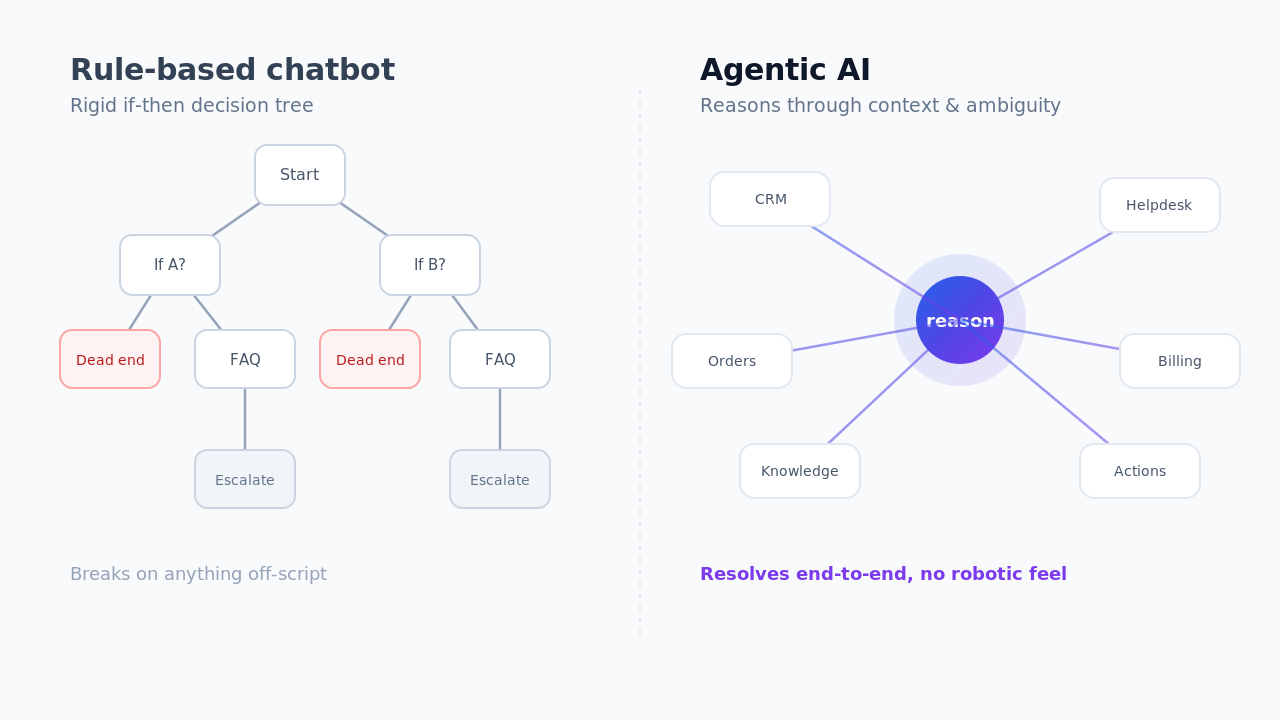
Answer the repeatable questions automatically. The majority of what arrives in a community support channel has been answered before, in documentation or in a previous ticket. An agentic AI layer on the customer-facing inbox resolves those end to end and escalates the genuinely novel ones with context attached, rather than deflecting them back into the channel they came from.
That third option is what Aissist.io builds — an AI operational layer that connects to Intercom, Zendesk, Freshdesk, Kustomer, Front, Gorgias, eDesk, Salesforce or HubSpot and resolves conversations inside the inbox you already run. It is not a community platform and it does not replace one; it is relevant here only because "our community became our support queue" is a support-operations problem wearing a community-platform costume. If that's the shape of your problem, our guides to the AI operational layer and reliable AI are the more useful pages.
Community turned into a support queue? Aissist.io resolves repeat customer questions end to end inside the helpdesk you already run — Intercom, Zendesk, Freshdesk, Front, Gorgias and more — and escalates the rest with full context. Book a demo →
Frequently asked questions
Can Discord be used for business?
Discord can be used for public communities where nothing of record lives, and many developer-tool and creator businesses do exactly that. It cannot serve as a system of record: there is no business tier at any price, so no SSO, admin console, audit log, eDiscovery, retention control, or uptime SLA exists in the product.
How much does Discord for business cost?
Nothing — and no paid tier adds business features. Nitro Basic at $2.99/month and Nitro at $9.99/month are personal cosmetic subscriptions for individual users, and Server Boosts at $4.99 improve audio and upload quality. None of them add SSO, admin controls, retention policy or compliance export.
Why don't businesses use Discord for internal communication?
Because the gaps are contractual rather than technical. Servers are owned by personal accounts, members can delete their own past messages, administrators cannot export message history, retention follows Discord's schedule rather than yours, Discord's DPA does not cover running a server, and Discord may terminate access at its discretion without notice.
Is Slack better than Discord for business?
For internal business communication, yes — Slack has SSO, audit logs, eDiscovery, retention control, a real DPA and a 99.99% uptime SLA, none of which Discord offers. Discord is better on voice, price and free message history: its free tier keeps unlimited history where Slack's deletes access after 90 days.
Can Discord replace Slack for a startup?
It can for a very early team with no compliance obligations, no enterprise customers and nothing confidential in chat. The switching cost arrives later — with no administrator export, migrating years of Discord history off the platform is not a supported operation, and your first enterprise security questionnaire will ask about SSO and retention.
What happened to Guilded?
Roblox sunset Guilded on 19 December 2025, taking the website and desktop and mobile apps offline and making all platform content inaccessible. Server owners were offered a content-export tool before shutdown. Guilded still appears on many 2026 "Discord alternatives" lists, which is a useful freshness test for those pages.
What is the best Discord alternative for a business community?
Circle at $89/month flat is the strongest option for monetized creator and customer communities, because pricing is per workspace with unlimited members. Bettermode at $399/month is the enterprise choice, being the only community platform here offering SAML SSO, audit logs, SOC 2 and an uptime SLA — though SAML, audit logs and the SLA require quote-priced Premium rather than the $399 Starter.
What is the best open-source Discord alternative?
Zulip for public technical communities, thanks to topic threading and four documented export modes including a filterable compliance export, with free Standard for qualifying open-source projects. Mattermost and Element are better fits when the requirement is self-hosted or air-gapped internal team chat rather than a community.
Does Discord support SSO or SAML?
No. Discord has no SAML or SSO for member authentication. Members sign in with personal Discord accounts and personal email addresses, so you cannot enforce your identity provider's MFA or conditional access, cannot deprovision access through your IdP, and cannot reliably tie a Discord identity to a verified customer or employee record.
Can I export my Discord server's message history?
Not as an administrator. Discord's data request process covers individual user data only, and server-wide message export is not a supported capability. Scraping is prohibited without written consent under the Terms of Service, and the Developer Terms require prompt deletion of API data once it is no longer needed for your application's stated functionality.
Changelog
- August 2026 — Initial publication. Pricing read from vendor pages 18–21 August 2026. Records Guilded's 19 December 2025 shutdown, Bettermode's removal of its free plan on 15 March 2026, Circle's Eclipse rollout completed 1 August 2026, and Zulip 12.0 released 27 April 2026.