The 5 Best Co-Browsing Software Tools in 2026, Compared on Data Masking
Compiled by M.W. Published October 28, 2026 · Last updated October 28, 2026.
Co-browsing software lets a support agent see, and sometimes guide, a customer's live browser session. This comparison covers the five tools we used while embedding co-browse into the human handoff behind our own AI agent, judged on the column nobody else publishes: how each one keeps personal and payment data off the agent's screen.
TL;DR: The masking model decides the purchase: Upscope alone states it auto-masks card numbers and SSNs, Cobrowse.io can redact everything until allowed, and only Cobrowse.io publishes a per-agent price ($18 a month).
- Best for private-by-default redaction: Cobrowse.io
- Best for never recording sessions: Glance
- Best for on-premise and single-tenant deployment: Surfly
- Best for automatic PII detection: Upscope
- Best for bug reproduction with session replay: Fullview
How we compared these tools
- Ground: these are the five co-browse tools we used when building the escalation layer behind Aissist's AI agent, where a human takes over the conversations the AI hands off.
- Criteria: masking model (allowlist vs. blocklist), what is masked with zero configuration, session recording and retention, named certifications, deployment options, and pricing mechanic.
- Sources: each vendor's own pricing, security and documentation pages, read 28 Oct 2026; ratings from G2 and Capterra on the same date. Where a vendor's page is silent, the table says "not stated" rather than guessing.
- Disclosure: this is Aissist's blog. Aissist sells AI customer service agents, not co-browse software, so none of these vendors is a competitor.
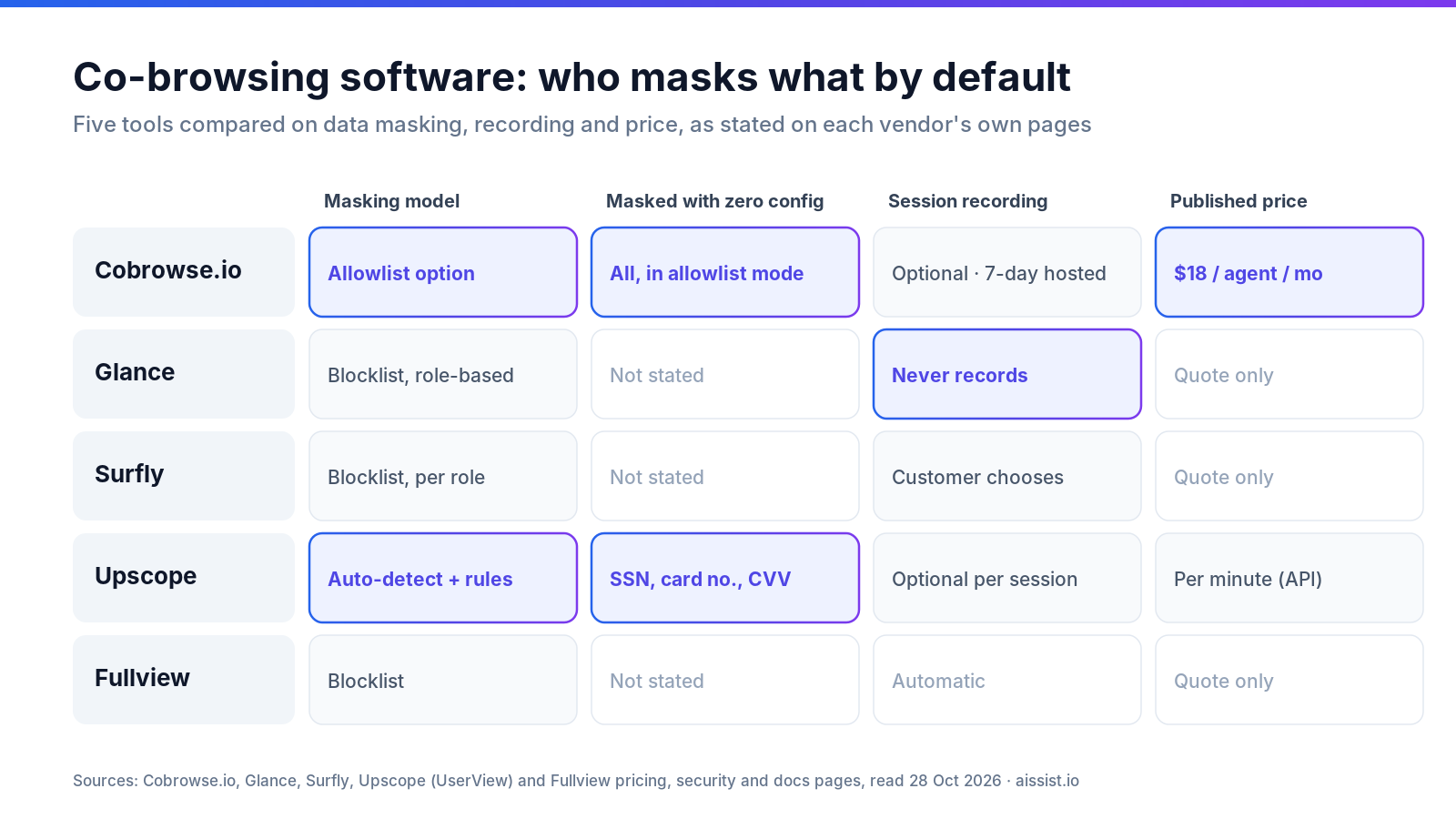
Which co-browsing tool masks the most data by default?
Upscope is the only vendor here that states it masks Social Security numbers, card numbers and CVV codes with no configuration; every other tool masks only what you tell it to, or, in Cobrowse.io's case, everything until you allow it. That difference is the whole article. A blocklist tool shows everything except the fields an engineer remembered to tag. An allowlist tool shows nothing except the fields someone approved. One fails open; the other fails closed.
| Tool | Masking model | Masked with zero config | Recording & retention | Named certifications (as stated by vendor) | Pricing mechanic (Oct 2026) |
|---|---|---|---|---|---|
| Cobrowse.io | CSS-selector redaction on the end user's device; optional allowlist ("private by default") | Nothing listed in docs; everything in allowlist mode | Optional; hosted recordings kept 7 days, session metadata 1 year | ISO 27001, SOC 2, HIPAA, GDPR, CCPA | $18/agent/mo web, $36 web + mobile, billed annually |
| Glance | Class or CSS-selector masking in the visitor's browser; role-based | Not stated | Never records or stores session content | ISO/IEC 27001, SOC 2 Type 2, CSA STAR Level 1 | Quote only |
| Surfly | Field and element masking per user or role; masked content removed and excluded from logs | Not stated | Customer chooses how much to record, including none; no session data stored on disk | SOC, ISO/IEC 27001, HIPAA (homepage) | Quote only |
| Upscope | Auto-detection plus field, section, CSS and class-based masking | SSNs, card numbers, CVV codes | Toggle per session; custom retention policies | SOC 2 Type II, ISO 27001, HIPAA, GDPR | API billed per minute, 100-hour monthly minimum |
| Fullview | Configurable field masking; page-level recording exclusions | Not stated | Records sessions automatically; retention not stated | SOC 2 (type not stated), GDPR | Quote only |
Two findings stand out. Glance's trust center says it never records, captures or stores session content, which removes an entire retention question. Fullview goes the other way: its cobrowse page says sessions are recorded automatically for QA and developer handoff, which is useful for debugging and a policy decision for compliance.
How do the five tools compare on fit and deployment?
Surfly offers the most deployment options (single-tenant cloud, private cloud or fully on-premise), while Cobrowse.io is the only one you can price without a sales call. Ratings are close enough that they should not decide anything.
| Tool | Best-fit team | Deployment options | Free trial | Rating (Oct 2026) |
|---|---|---|---|---|
| Cobrowse.io | Mid-market and enterprise with web and mobile apps | Hosted, private cloud, on-premise (Custom plan) | Yes | G2 4.4 (16) |
| Glance | Enterprise financial services and contact centers | Hosted | Demo | Capterra 4.3 (10) |
| Surfly | Regulated enterprises needing data residency | Single-tenant cloud, private cloud (AWS/Azure), on-premise | Yes | Capterra 4.7 (13) |
| Upscope | SMB to enterprise, developers embedding via API | Hosted, on-premise | 14 days | Capterra 4.4 (92) |
| Fullview | SaaS support and product teams | Hosted | 14 days | Capterra 5.0 (3) |
"The Screen sharing, ease of use and privacy features are the obvious stand outs." — James B., Business Support Manager, Insurance, Capterra review of Surfly
The five co-browsing tools, reviewed
1. Cobrowse.io — best for private-by-default redaction
Cobrowse.io is a co-browsing SDK for web and mobile apps that redacts sensitive content on the end user's device before anything reaches the agent.
Key facts: allowlist mode documented in its web redaction docs; recordings optional and kept 7 days per its data storage article; $18 per agent per month for web.
- Pro: redacting
bodyand un-redacting safe elements makes "fails closed" a one-line setting. - Pro: the only published per-agent price in this list.
- Con: no built-in redaction set is listed; blocklist mode depends on your selectors.
- Con: self-hosting sits on the unpriced Custom plan.
Our take: the right default for anyone with payment or health data in the app. Skip it if your team wants masking handled for them with no rules to write.
2. Glance — best for never recording sessions
Glance is an enterprise co-browse and screen-share platform that masks fields in the visitor's browser and does not store session content.
Key facts: masked contents "never leave the visitor's browser," per its security architecture docs; SOC 2 Type 2 and ISO/IEC 27001 per its trust center; quote only.
- Pro: no recordings means no recording-retention policy to defend.
- Pro: role-based masking, so a supervisor and a tier-1 agent can see different things.
- Con: no published pricing.
- Con: HIPAA is not named on the trust center page; ask for it in writing.
"These fields are automatically obscured in real time." — Heather Nightingale, Glance blog
Our take: strongest for financial services teams whose auditors dislike stored video. Skip it if QA depends on reviewing past sessions.
3. Surfly — best for on-premise and single-tenant deployment
Surfly is a co-browsing platform that proxies the session, so masking and element hiding work without changing the website's code.
Key facts: masked content is removed entirely and excluded from logging, per its security and compliance page; single-tenant servers, private cloud or on-premise; quote only.
- Pro: on-premise mode where Surfly states it has no access to the server.
- Pro: audit logs go to a destination the customer chooses.
- Con: its security page attributes ISO 27001 to its data centers; confirm Surfly's own certificate.
- Con: quote-only pricing.
Our take: the pick when data residency is a contract clause. Skip it if you want self-serve setup this afternoon.
4. Upscope — best for automatic PII detection
Upscope is a co-browsing company whose support product, UserView, and cobrowsing API detect and mask common identifiers automatically.
Key facts: auto-masks SSNs, card numbers and CVV codes, and states masked data "never touches our servers," per its security page; API billed per minute with a 100-hour minimum and session recording at $0.03 per minute extra, per its API pricing.
- Pro: the only tool here with masking that works before anyone writes a rule.
- Pro: SOC 2 Type II monitored through Drata, reports under NDA.
- Con: its products span several brands and sites, which makes procurement research slower.
- Con: BAAs and SLAs require a 5,000-hour monthly commitment on the API.
"Upscope is the simplest and easiest way to screenshare." — Fotios K., Customer Support Team Lead, Capterra review
Our take: best safety net for teams with many forms and few engineers. Skip it if you need a BAA at low volume.
5. Fullview — best for bug reproduction with session replay
Fullview is a co-browse tool for SaaS support teams that records sessions and now feeds session context to AI agents through Fullview MCP.
Key facts: automatic recording, configurable masking included on every tier per its pricing page; SOC 2 and GDPR listed on its trust center; custom quote.
- Pro: recordings with clicks and console errors shorten developer handoff.
- Pro: masking included at every tier rather than gated.
- Con: recording retention period is not published.
- Con: SOC 2 type is not stated.
Our take: strongest for product-led SaaS where the escalation is usually a bug. Skip it for regulated data unless retention terms are in the contract.
When is co-browse the right tool for an AI escalation?
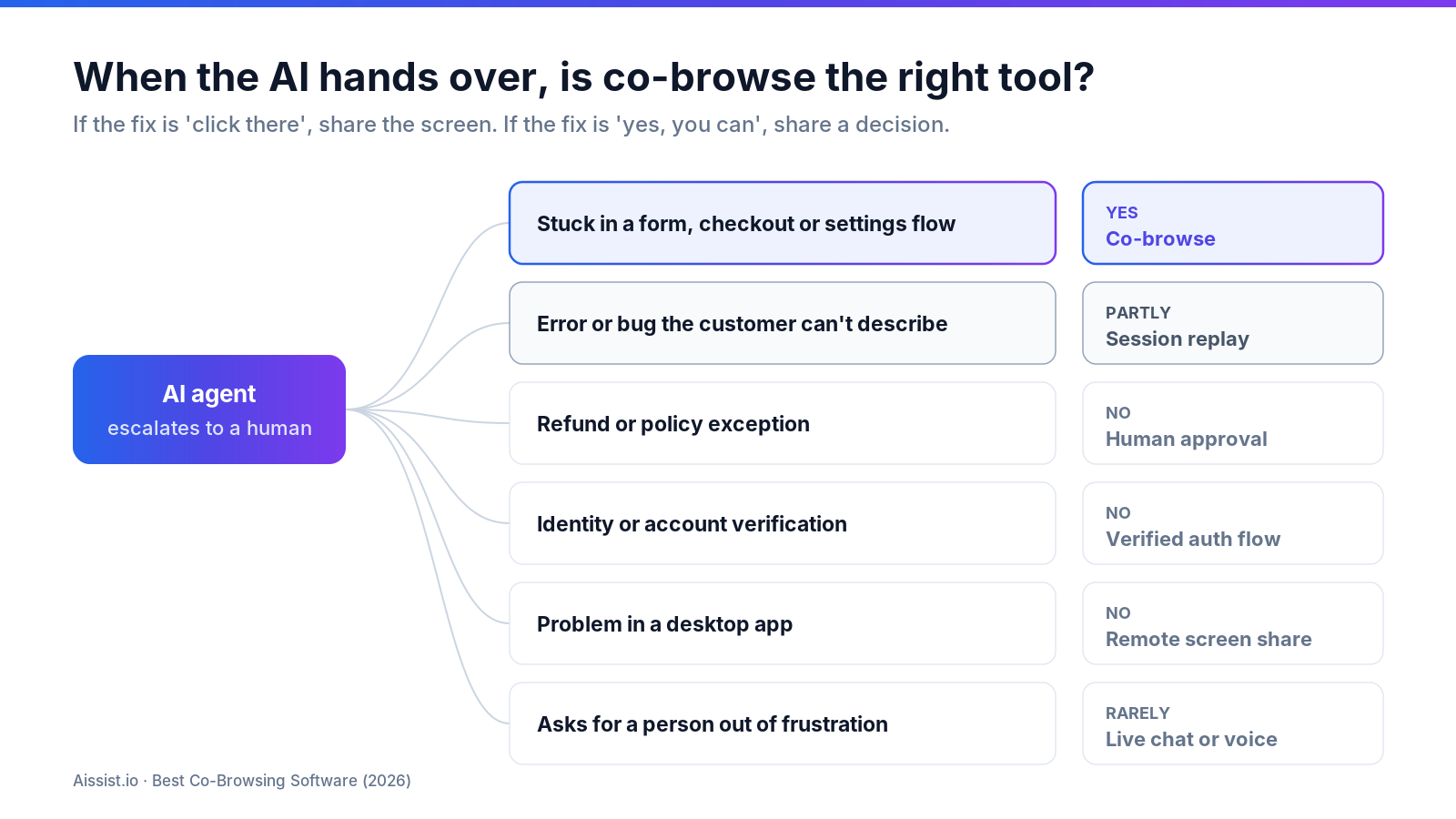
Co-browse is the right tool when the customer is stuck inside a web flow the AI cannot see, and the wrong one when the escalation needs authority or identity rather than eyes. Aissist reports an 83% average resolution rate for its AI agent, so the handoff layer only sees the hard remainder. Building that layer is where we learned co-browse earns its place in exactly one kind of conversation.
| Escalation type the AI hands over | Co-browse? | Better tool |
|---|---|---|
| Customer stuck in a form, checkout or settings flow | Yes | — |
| Error or bug the customer can't describe | Partly | Session replay (Fullview-style) |
| Refund or policy exception | No | Human approval in the helpdesk |
| Identity or account verification | No | Verified auth flow; co-browse exposes PII |
| Problem in a desktop app outside the browser | No | Remote support screen share |
| Customer asks for a person out of frustration | Rarely | Live chat or voice first |
The rule is simple: if the fix is "click there," share the screen. If the fix is "yes, you can," share a decision. Our guides on proactive escalation and escalation management cover the triggers; real-time agent assist covers what the human sees when they arrive.
Masking model, not feature list, decides the shortlist
Pick the tool whose masking default matches who will maintain it. If engineers will own redaction, Cobrowse.io's allowlist fails safe. If nobody will, Upscope's auto-detection is the floor. If the auditor objects to stored video, Glance never records; if residency is contractual, Surfly runs on your servers; if the escalation is usually a bug, Fullview's recordings pay for themselves. Then ask every vendor the question three of five pages don't answer: what is masked on day one, before anyone configures anything? For how Aissist handles customer data on its side, see our security page.
Frequently asked questions
What is co-browsing software?
Co-browsing software lets a support agent view and interact with a customer's web page in real time, sharing only the browser tab rather than the whole screen, usually with sensitive fields masked.
What is the difference between co-browsing and screen sharing?
Co-browsing shares one web page or app and can mask individual fields; screen sharing transmits the whole screen as video, so anything visible, including other tabs and notifications, reaches the agent.
Is co-browsing HIPAA compliant?
It can be. Cobrowse.io, Surfly and Upscope state HIPAA compliance on their own pages; confirm a signed BAA and the masking configuration before healthcare data appears in a session.
Does co-browsing record the customer's session?
It depends on the vendor. Glance says it never records session content, Cobrowse.io and Upscope make recording optional, and Fullview records sessions automatically.
How much does co-browsing software cost?
Cobrowse.io publishes $18 per agent per month for web, billed annually. Upscope's API bills per minute with a 100-hour monthly minimum; Glance, Surfly and Fullview quote on request.
Can an AI agent hand a conversation to a co-browse session?
Yes, when the helpdesk passes the transcript and intent to the human agent, who then starts co-browse. It suits navigation problems, not refunds or identity checks.
Changelog
- 28 Oct 2026 — First published. Pricing and certifications read from vendor pages on this date.