Call center staffing comes down to three numbers: the agents Erlang C says you need on the phones, the extra headcount shrinkage eats, and the agents automation actually removes. Below are the formulas, two worked examples with every input stated, a sourced shrinkage table, and the re-run most guides skip.
Compiled by M.W. Published October 13, 2026 · Last updated October 13, 2026.
TL;DR: In Aissist.io's Erlang C model, a 40% AI containment rate removed 13–38% of scheduled agents, not 40% — so plan headcount on verified resolution and the longer handle time of what remains.
Methodology & sources
- Erlang C model written by Aissist.io in Python and checked against Call Centre Helper's published worked example (both return 14 agents at 88.8% service level).
- Shrinkage benchmarks from Call Centre Helper, Dimension Data (as reported by Call Centre Helper) and a KnowlAgent survey; dates and sample sizes in the table.
- Containment and resolution context from Gartner (5,728 customers, December 2023) and Forrester via No Jitter.
- The 15% handle-time increase and 28% resolution in the AI scenarios are stated assumptions, not measurements. All sources verified October 2026.
- Disclosure: this is Aissist.io's blog, and Aissist sells AI agents priced per resolution.
How do you calculate call center staffing with Erlang C?
Erlang C calculates the probability a contact waits for a given number of agents; you raise the agent count until the service level and occupancy targets are both met. It needs four inputs: contacts per hour, average handle time (AHT), the target service level, and the target answer time. Danish engineer A. K. Erlang derived it for telephone exchanges; it transfers to any queue where contacts wait for the next free agent.
First, convert volume into workload. Traffic intensity A, measured in Erlangs, is contacts per hour × AHT in seconds ÷ 3,600. Then, for N agents:
P(wait) = [ A^N / N! × N/(N−A) ] ÷ [ Σ(i=0..N−1) A^i / i!  +  A^N / N! × N/(N−A) ]

Service level = 1 − P(wait) × e^( −(N − A) × target answer time ÷ AHT )

Average speed of answer = P(wait) × AHT ÷ (N − A)
Those are the formulas Call Centre Helper uses in its step-by-step example. Start N just above A and add one agent until service level clears target and occupancy (A ÷ N) sits under your cap.
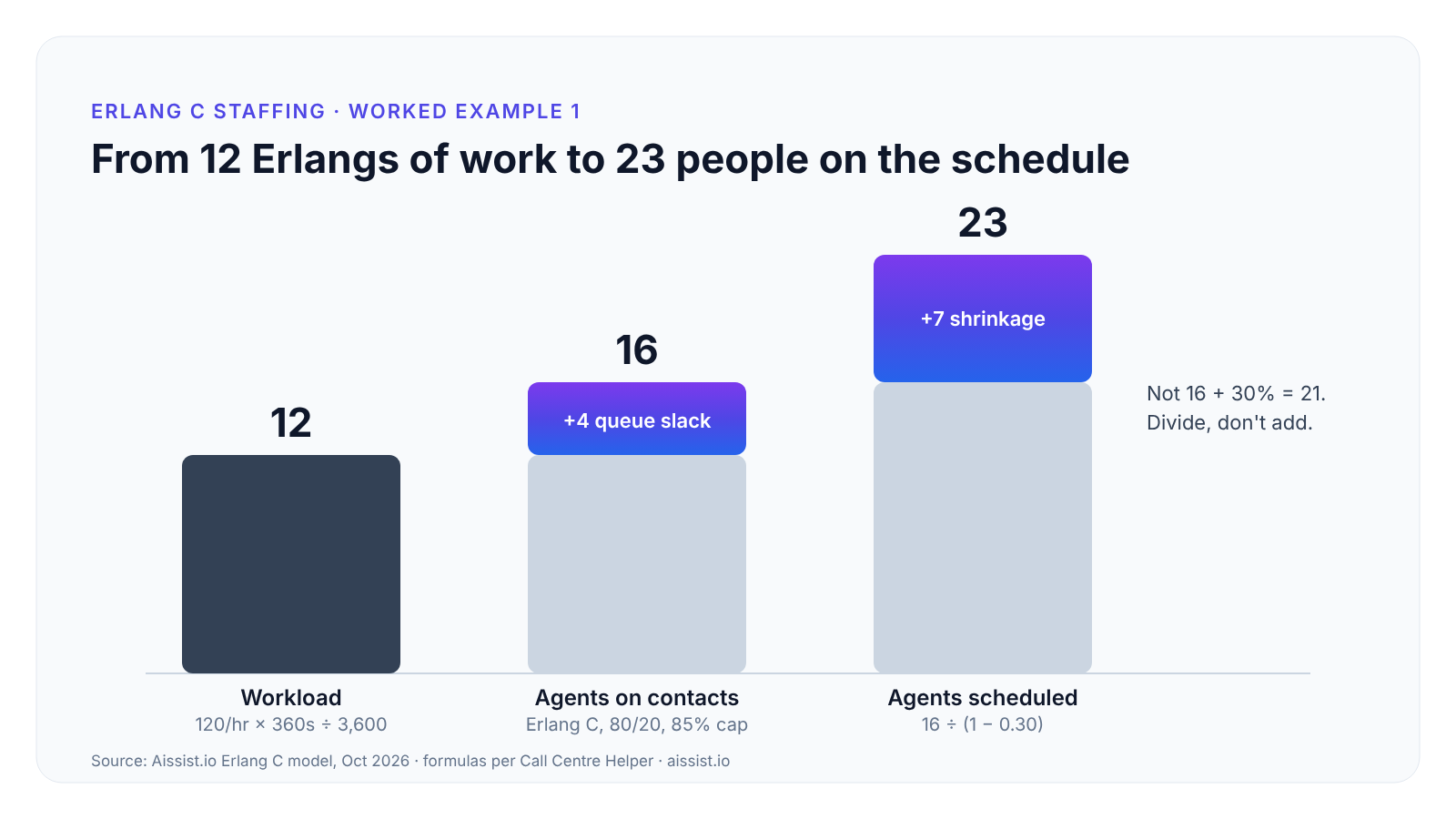
Worked example 1: 120 contacts an hour at a 6-minute (360-second) AHT is 12 Erlangs of work. Against an 80/20 target (80% answered within 20 seconds) and an 85% occupancy cap, Erlang C returns 16 agents on contacts: 83.6% service level, 75% occupancy, 18-second average speed of answer.
Before trusting our own model, we ran Call Centre Helper's published inputs through it — 200 contacts an hour, 180-second AHT, 80/20. It returned their answer exactly: 14 agents, 88.8% service level. Spreadsheet math deserves an audit too.
Note the gap: 12 Erlangs of work needs 16 people, because a queue needs slack to absorb random arrivals. That slack is where staffing gets interesting.
What inputs does an Erlang calculator need, and where do you find them?
An Erlang calculator needs four helpdesk numbers plus two planning assumptions — shrinkage and occupancy cap — and most staffing errors come from feeding it the wrong version of one of them. Pull a peak hour, not a daily average: an Erlang model fed a daily mean will staff the quiet afternoon and abandon the Monday morning.
| Input | What it means | Where to find it in your helpdesk | What happens if you get it wrong |
|---|---|---|---|
| Contacts per hour | Contacts arriving in the interval you are staffing | Interval volume report, by channel and hour | Using a daily average understaffs every peak |
| AHT (seconds) | Talk or reply time plus after-contact work | Handle-time report; include wrap-up | Leaving out wrap-up understates workload by its full length |
| Service level target | Share of contacts answered within the target time | Your SLA or support policy | A target nobody set defaults to whatever the calculator suggests |
| Target answer time | Seconds a contact may wait | SLA; chat and email need longer windows than voice | Applying a voice target to email overstaffs |
| Shrinkage % | Paid time not available for contacts | WFM or payroll: leave, training, meetings, breaks | Adding it instead of dividing by it (next section) |
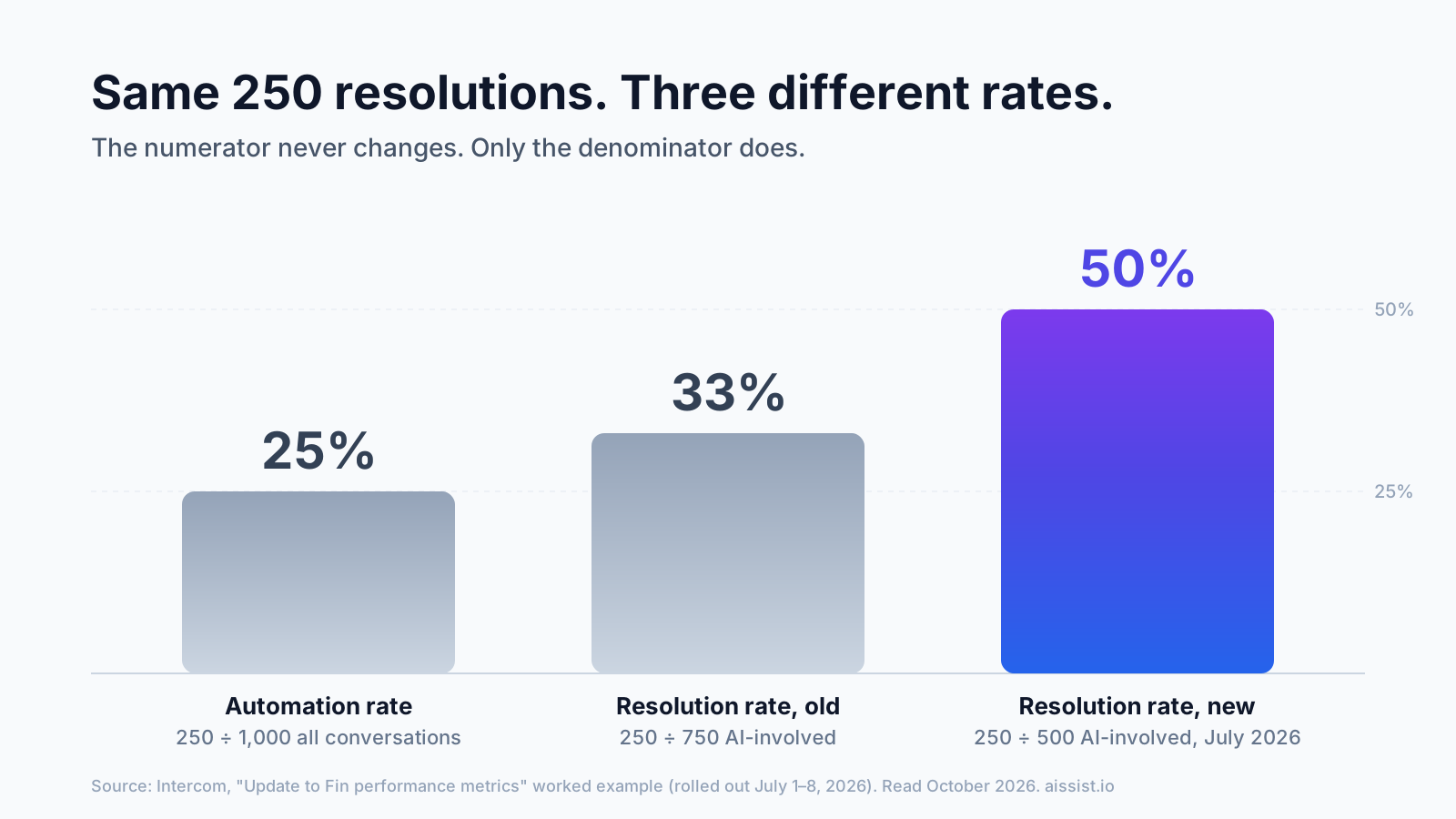
| AI resolution % | Contacts the AI fully resolves, with no return | AI reporting — resolved, not merely contained | Using containment overstates agents saved |
Chat breaks one Erlang assumption: an agent working three chats at once is not three agents. Divide chat AHT by realistic concurrency before modelling, or the calculator will hire for a phone queue you don't run.
How much shrinkage should you budget for?
Budget 30–35% call center shrinkage unless you have measured your own; published benchmarks range from 24% to 35%, and the figure is divided into the agent count, not added to it. Shrinkage is paid time agents can't take contacts — leave, sickness, training, coaching, meetings, breaks.
| Source | Figure | Sample and date |
|---|---|---|
| Call Centre Helper | 30–35% typical range | Practitioner consensus; updated July 2026 |
| Dimension Data Global Benchmarking Report, via Call Centre Helper | 35% average | As reported in the same article |
| Call Centre Helper webinar poll | Around 30%; 38% of centers at 21–30% | 113 respondents, September 2013 |
| KnowlAgent survey | 24% average; most common answer 26–30% | 100+ respondents, published 2011 |
The arithmetic is where budgets go wrong. Call Centre Helper's example: 70 agents needed at 30% shrinkage means scheduling 70 ÷ 0.7 = 100, not 70 + 30% = 91. The shortcut leaves nine seats empty every interval, which you'll discover around the second week of flu season.
Applied to worked example 1, 16 agents on contacts becomes 16 ÷ 0.7 = 23 agents scheduled.
Occupancy is the other ceiling. Call Centre Helper recommends staying at or below 85%, because sustained high occupancy drives attrition.
"You don't want to think about occupancy as how busy you are…" — Penny Reynolds, Founding Partner, The Call Center School, via Call Centre Helper
How many agents does AI containment actually remove?
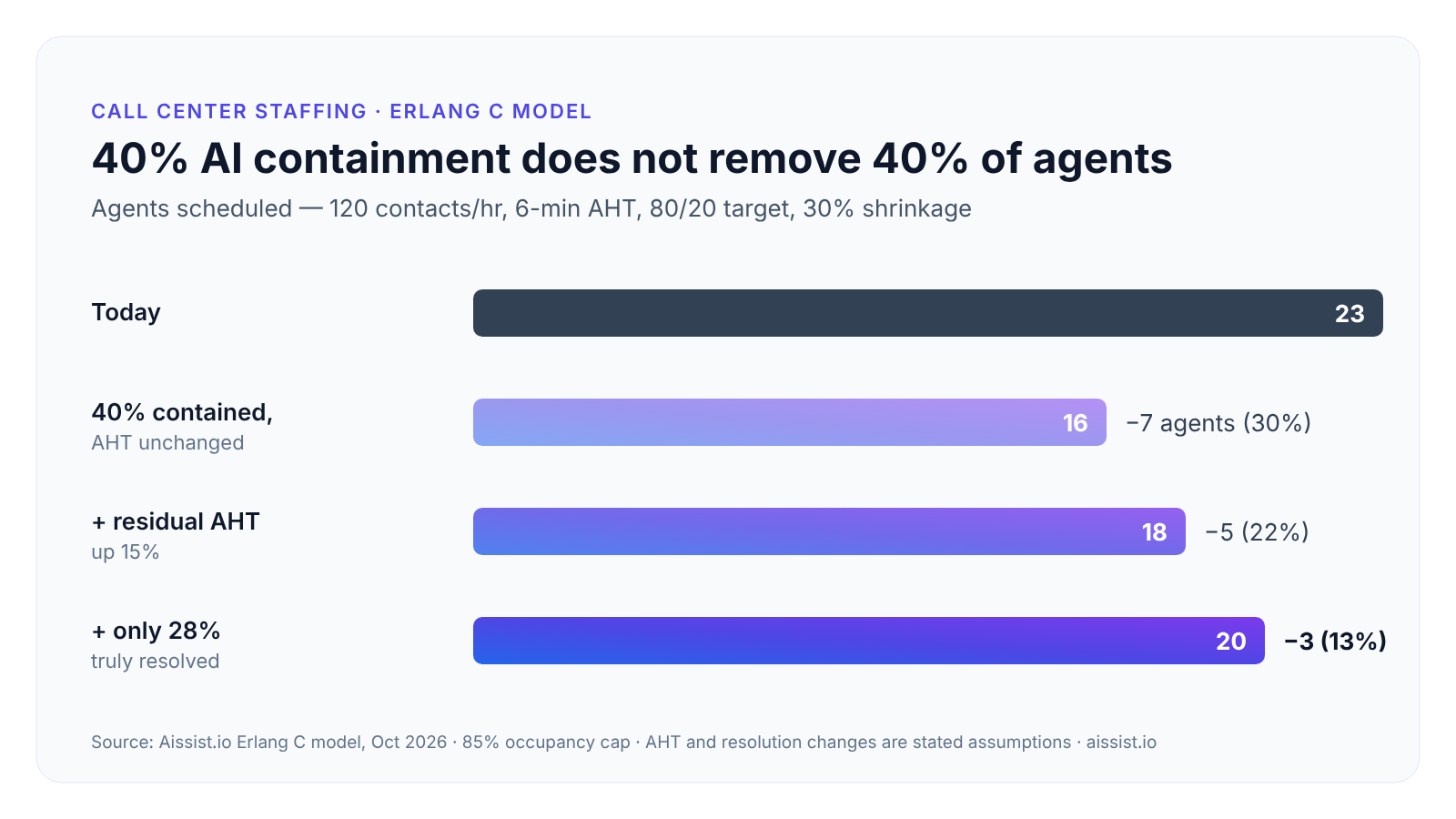
In our Erlang C model, 40% AI containment removed 30% of scheduled agents in the best case and 13% in a realistic one, because three effects each claw back part of the saving. Here is worked example 1 re-run with everything else held constant.
| Scenario (120 contacts/hr, 80/20, 30% shrinkage) | Contacts/hr to agents | AHT | Agents on contacts | Agents scheduled | Removed |
|---|---|---|---|---|---|
| Today | 120 | 360s | 16 | 23 | — |
| 40% contained, AHT unchanged | 72 | 360s | 11 | 16 | 7 (30%) |
| 40% contained, residual AHT +15% | 72 | 414s | 12 | 18 | 5 (22%) |
| 40% contained, 28% truly resolved, AHT +15% | 86 | 414s | 14 | 20 | 3 (13%) |
Scale works against you. Small queues need proportionally more slack, so 40% fewer contacts gives only 30% fewer agents before anything else changes.
Residual contacts run longer. The AI takes the easy ones.
"If you contain the easy quick ones, your average handle time will go up." — Christina McAllister, Senior Analyst, Forrester, via No Jitter
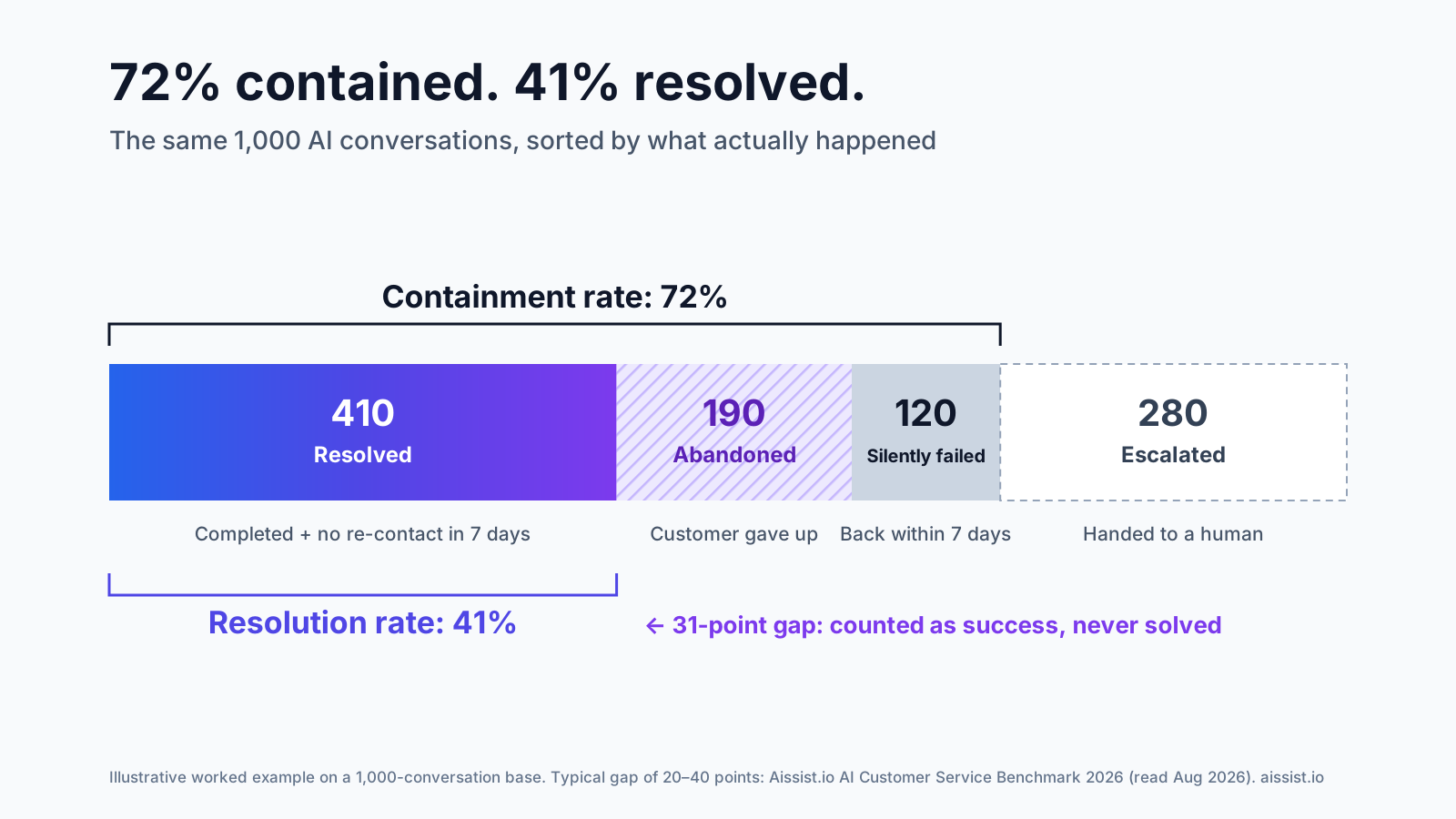
Contained is not resolved. A contact that ends in the bot but comes back through another channel still needs an agent. Gartner found only 14% of service issues were fully resolved in self-service, and 36% even for issues customers called very simple. Our containment rate guide shows how far the two numbers drift apart.
Size changes the answer. Worked example 2: 400 contacts an hour at a 7-minute AHT needs 55 agents on contacts and 79 scheduled. The same three scenarios remove 38%, 30% and 16% — larger centers keep more of their pooling efficiency.
How should you plan headcount around AI?
Plan headcount on the AI's verified resolution rate and the new AHT of what remains, then let attrition — not layoffs — absorb the difference. Forrester's McAllister makes the same point in the No Jitter piece: high attrition lets headcount shrink naturally, which also leaves room to correct a wrong forecast.
- If your AI reports containment, not resolution, model the resolution figure, because only resolved contacts leave the queue for good. Our AI resolution rate guide defines it; the resolution benchmark checker shows realistic ranges by industry.
- If your team is under 20 agents, expect the smallest saving per point of containment, because small queues lose pooling efficiency fastest.
- If residual AHT is unmeasured, re-run your model at +10% and +20% and staff to the higher result for the first quarter.
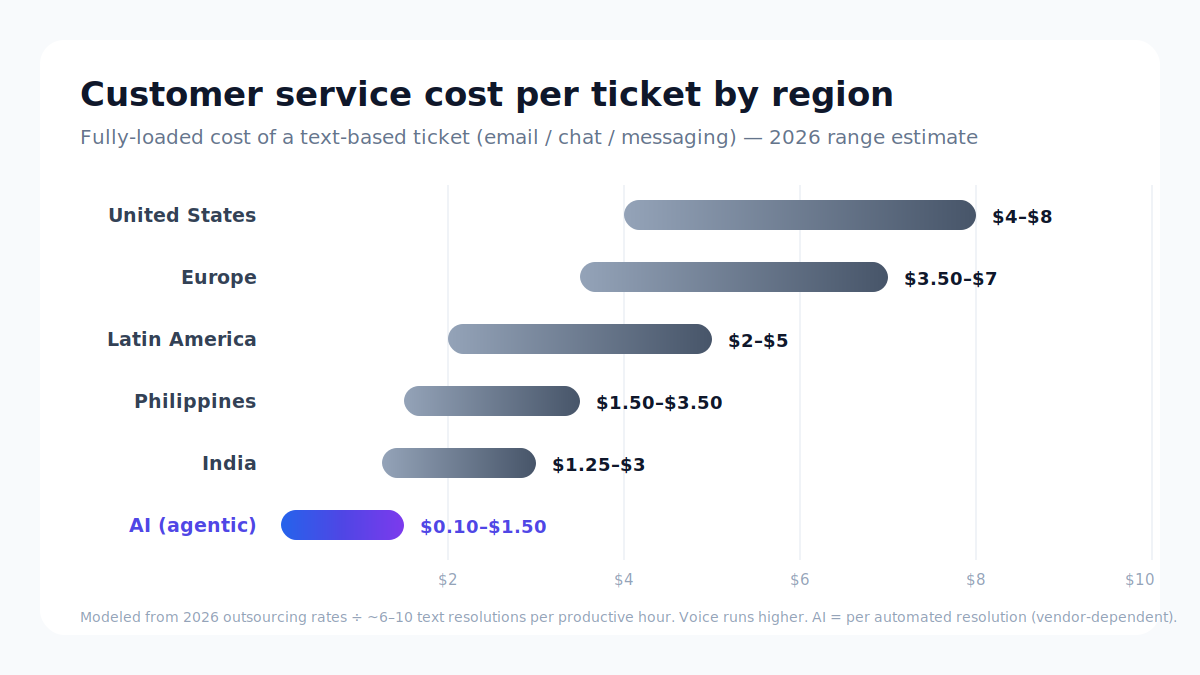
- If you are budgeting, convert agents removed into cost with your fully loaded cost per ticket, then net off what the AI costs per resolution.
"Resolution is the only number that pays the bill, and it deserves honest measurement." — Lifan, Co-Founder, Aissist.io, benchmark announcement (July 2026)
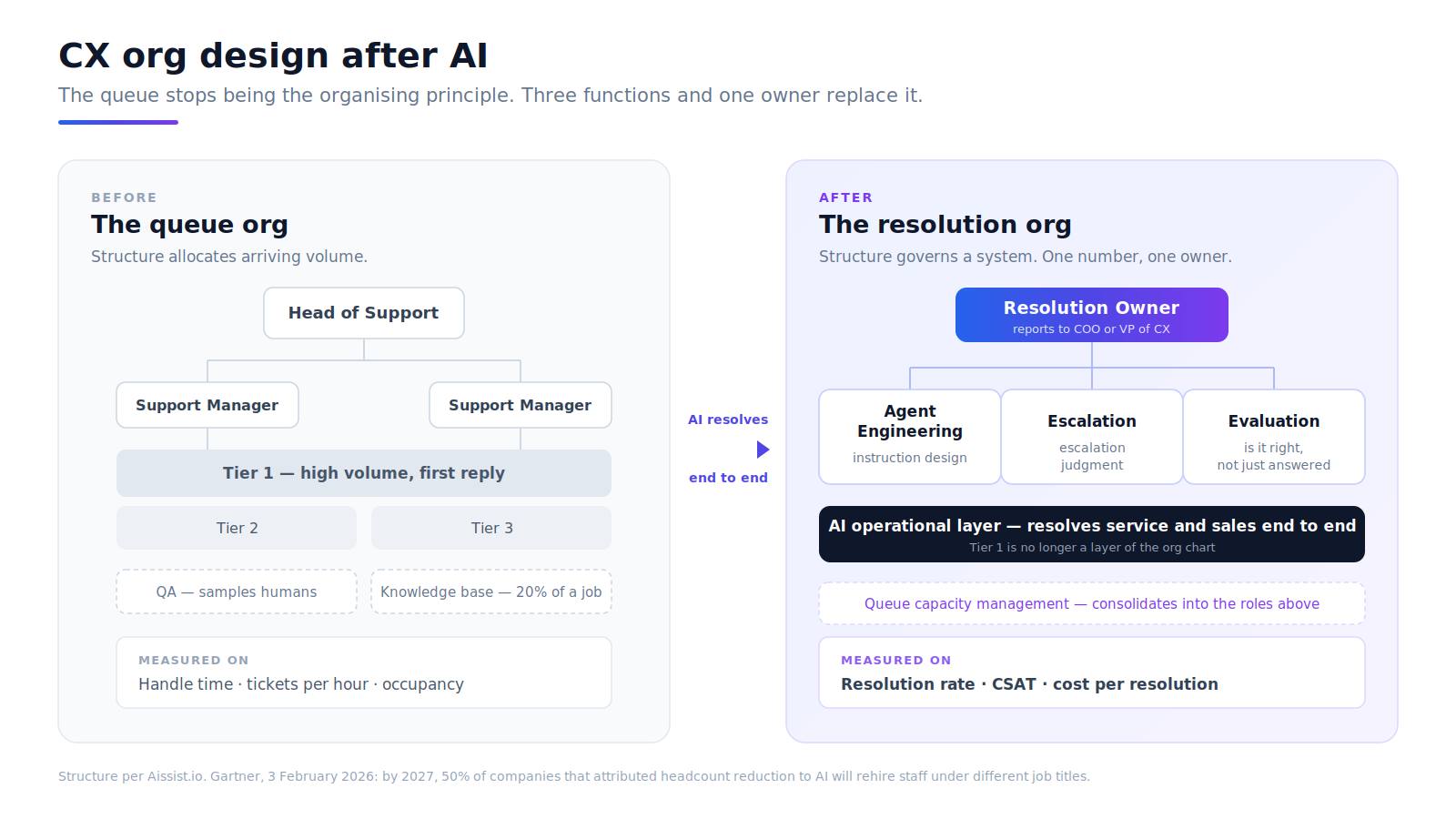
The agents who stay handle harder work, so the roles change too; our piece on CX org design after AI covers who should own resolution.
Plan headcount on resolution, not containment
Erlang C, shrinkage and occupancy haven't changed in decades. What has changed is how much volume reaches the queue — and the dangerous number is the containment rate on a vendor slide. Run the model three times: today, with resolved volume removed, and with residual AHT raised. The gap between the first and third runs is your real headcount saving, and in our realistic scenarios it was a third to two-fifths of what the containment rate implied. Then track the KPIs that tell you whether it held.
Run your own numbers. Enter your volume, handle time, shrinkage and AI resolution rate and see the agents saved. Open the staffing calculator →
Frequently asked questions
What is a good occupancy rate for a call center?
Most planners cap occupancy at 85%, the ceiling Call Centre Helper recommends, because sustained higher occupancy increases burnout and attrition. Small teams run lower because Erlang C forces extra slack into small queues; a 16-agent team at 80/20 lands near 75%.
Is Erlang C accurate for chat and email?
Erlang C assumes one contact per agent and customers who wait indefinitely, so it overstaffs concurrent chat and ignores abandonment. Adjust chat AHT for concurrency, use longer answer targets for email, and treat the output as a planning baseline.
What is the difference between Erlang B and Erlang C?
Erlang B models blocked contacts that are lost, such as calls getting a busy signal, and sizes trunk lines. Erlang C models contacts that queue until answered, which is why contact centers use it for agent staffing.
How do you calculate call center shrinkage?
Divide hours agents are paid but unavailable for contacts by total paid hours. Any shrinkage calculator then divides required agents by (1 − shrinkage): 16 agents at 30% shrinkage means scheduling 23, not 21.
How many agents do I need for 100 calls an hour?
At a 5-minute AHT and an 80/20 target, 100 calls an hour is 8.3 Erlangs and needs 12 agents on the phones, per Erlang C. With 30% shrinkage, schedule 18.
Do I need workforce management software to staff a call center?
A single-skill team can staff from an Erlang calculator and a spreadsheet. Call center workforce management software earns its cost once you need multi-skill routing, schedule adherence tracking and intraday re-forecasting across many shifts.